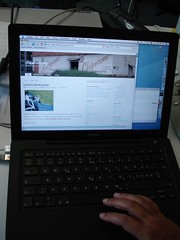
when it was still new and pristine…
At Lift 07 there was a panel on technological overload. The video of the panel is available here.
Update: Since Google Video is no more, the video can be viewed on Vimeo
Panel Discussion:Dealing with technological overload (Lift07 EN) from Lift Conference on Vimeo.
Fellow blogger Mlle. A. pointed out that this kind of discussion isn’t new.
A couple of days ago she sent in an article by Ann Blair on “Reading Strategies for Coping with Information Overload ca. 1550-1700” published in 2003 in the Journal of the History of Ideas.
As more and more books were published, academics worried about keeping up: they discussed the effects of reading manuals and encyclopedias or reading “only in parts”. And discussed strategies to classify information, added indexes and used cut and paste to arrange the information they received.
Blogging isn’t new either:
“Reading is useless, vain and silly when no writing is involved, unless you are reading (devotionally) Thomas a Kempis or some such. Although I would not want even that kind of reading to be devoid of all note taking.”
Interesting stuff.

Running didn’t go well today. I was totally demotivated. Although I’ve been training regularly all summer, I was slow and running behind the group. After about 45 or 50 minutes I slumped in a deep dark “not motivated” hole. And knowing the route didn’t help much either, ‘cos it demotivated me even further.
In case you haven’t heard:
There seems to be an outbreak of blogging fatigue
Is it similar to battle fatigue?

The newness of my MacBook is decreasing rapidly. I’ve installed GIMP (works nice and zippy), GraphicConverter (useful for quick resizing of images), TextWrangler (an editor), MS Office 2004 (although I’m considering to install NeoOffice and use MS Office via Parallels only).
I had a look at the websites of Scribus and Inkscape, but I think I’ll wait before installing them.
I’ve installed the Subversion command line client and a little plugin (aargh, can’t remember the name) that allows you to upload and commit files from the finder. I didn’t like SvnX much.
I like the size of my MacBook. Much easier to lug around. Quicksilver is very useful.
(update) The SVN plugin is called SCPlugin.
Howard French, senior writer at the New York Times on:
New Power in Africa: Entrepreneurs From China Flourish in Africa
The Malawi Investment Private Agency (MIPA) lists various costs associated with setting up a business.
Unfortunately I don’t see a date so it’s hard to say if these figures are up-to-date or not.
Here are some quick notes on installing a CVS client on my MacBook (for my own future reference):
à ¨ voila. A console window shows the files being checked out to your hard disk. Work Area shows you an overview of the new or modified files.
First impression: It’s more like WinCVS and less like TortoiseCVS.
Disclaimer: I’m a low and humble content developer and use CVS and Subversion for versioning at my day job. If I get something very wrong or if you have useful tips, please leave a comment. I’m moving from Windows to Mac and documenting my experience.
Regarding version control:
I used an older version of Visual Sourcesafe a couple of years ago and IMHO, CVS and Subversion are easier to use once you’ve got past the install hurdle. Subversion’s next on my install list.
SSH is pre-installed on the Mac: Open Terminal and type ssh followed by your username@hostname.
As you can see I’m having a lot of fun.
Here’s my comment I submitted a couple of minutes ago at Climb to the Stars on Most People Are Multilingual (cos I’m not sure if my comment wasn’t gobbled):
In southern Africa (Zambia, Zimbabwe, Malawi, SA) most people are multi-lingual with varying levels of language competency in at least 3 languages.
For example in Malawi, children learn English and Chichewa from the first class onwards. Their mother tongue being Chitumbuka or Chisena or Chilomwe. At secondary school level, nearly all subjects are taught in English.

My new MacBook arrived last Monday. And I’ve started installing software and exploring. Slowly. A new laptop is like getting a new exercise book at school. An empty book equals an empty hard disk. And a new operating system is a new learning experience.
Software installed so far:
And here’s the list that I’ll still need to add:
I found some useful articles at Tao of Mac, which I’d like to share:
BTW, I’m planning to set up an Ubuntu laptop soon… on a separate machine.
Capital FM is uploading its daily morning show to the web:
The only early morning radio show in Malawi with a complete range of the latest news, views and interviews from across the country. You can now listen to daily recordings of Daybreak Malawi Online and keep abreast with what is going on in Malawi.

I started reading “The new rules of Marketing and PR” yesterday, and I like it. I’m at Chapter 3, and so far it’s a good summary of things I’ve discovered. Reinforcing experiences which I’ve been calling Low Budget Internet Marketing.
A couple of notes:
Meerman’s right about the way consumers and buyers do their own research, ignoring the advertising to a large extent. And evaluating on their own. Take me as an example: I’m in the marketplace looking for an entry-level DSLR and I’m reading review sites, asking questions, watching the news and prices.
(Yes. My evaluation process is long. And I overdo it sometimes. But then I’ve been working in IT for the past 9-10 years. 6 months minimum.)
The Learning Effect of Blogging:
There’s one effect I’d like to highlight: by setting up my own blog, posting short tumble blog-like entries, and keeping track of a couple of marketing bloggers, the new rules aren’t that new to me. Blogging is a great way to learn. Instead of watching from the sidelines, my advice is to dive in.
I’ll try to post a summary as I go along… Mlle. A. is reading the same book. Between the two of us, we’ll get some two-way discussion going. Feel free to join us.
Drinking coffee and listening to Scoble’s video on Twitter.
For future reference ( or never 😉 cos I don’t feel like installing any of these now):
There’s a desktop client for Twitter called Spaz. Downside: you need to download 9 megs of Adobe AIR beforehand.
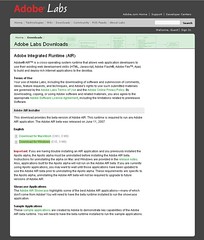
Twitter.pbwiki.com lists a long list of Twitter apps.
Here’s a description how to set up TwitterVision as your Windows XP desktop.
Just a note to say that we need to find a better solution for this login and password nightmare called Web 2.0.
I can’t say how many times I’ve left a website without leaving a comment ‘cos I had to login to leave a comment…
And another Web 2.0 feature request: please offer some kind of Delete my account option.
Somewhat related:
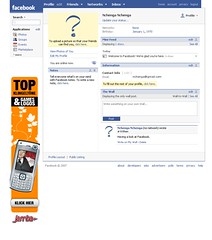
One of the reasons I don’t like Facebook: Walls. And tonnes of dialog boxes asking me to confirm my choices. All the time.
(update) there’s a post about Facebook’s walled gardens.
Via Flickr mail I asked somebody who seems to be on the Ipernity payroll:
Thanks for leaving a comment in my photostream.
I was wondering if you could answer my question regarding Ipernity’s funding.Who are the investors?
Is it independent? Is it funded by venture capital? Or does it belong to another company?See my blog post: The most interesting pictures
Here’s the answer I received via Flickr mail:
ipernity is french company totally independent and self-funded.
Well. I still think it looks a bit like Sixapart’s Vox.
I found this site via Development Gateway. It compares economies and offers rankings to quantify how easy it is to set up or shut down a business:
Doing Business in Malawi
Here are my short notes on new WordPress plugins I’m trying out at Chiperoni.ch:
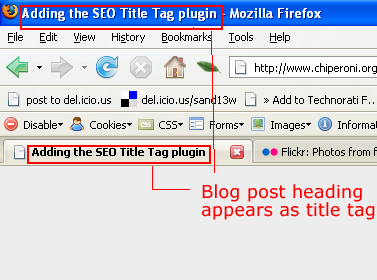
SEO Title Tag
I read about this in a WordCamp 2007 report last weekend. The corresponding plugin web page is here.
If you’re using K2, open header.php and replace everything within the title tag with this:
e voilà :
Bad behavior
According to the website:
Bad Behavior complements other link spam solutions by acting as a gatekeeper, preventing spammers from ever delivering their junk, and in many cases, from ever reading your site in the first place. This keeps your site’s load down, makes your site logs cleaner, and can help prevent denial of service conditions caused by spammers.
And yes, my logs are cleaner. Less spam is slipping thru into the comment moderation queue.
Stats plugin
I’ve been using Counterize II for a couple of months and can recommend it.
If you’re in a hosted setup like WordPress.com, you could use a service like Sitemeter, Statcounter, or Google Analytics.
I’ve decided to move to Mac… and I’ve been asking other Mac users for tips regarding software. And the list is long.
I’ve been reading thru various WordCamp 2007 posts. And I’ve found quite a number of useful tips. This evening I quickly skipped thru Lorelle’s slides:
with lots of very useful advice how to build content.
Just a couple of thoughts to carry on the conversation:
I agree that you should spend extra time to write better posts. But don’t be shy to hit the Publish button at an early stage either. Participate.
Experiment, learn, and evolve.
It’s kind of an ongoing process.
I tend to post a high percentage of very short blog entries: tumblr-like. Just an introductory text and a link. Or a block-quote. Or a photo. Or a video. Fragments of captured attention. Yet I’ve found that in time seemingly stranded-looking posts fall into place in a larger context. Cos I can embed them in a larger text.
I think the main point is to be authentic. But don’t publish every single personal detail.
If you are blogging for yourself, it’s perfectly acceptable to go ahead and write the 1 860 001st entry on how to install WordPress, especially if it helps to learn. You won’t get any traffic. But if you’re a little bit like me, writing about a topic will help to understand and reflect. And you’ve got notes and links you can refer to later. BTW, other how-tos on other issues will get you lots of hits.
That said I’ve got a couple of trivial CSS and JavaScript and WordPress posts lined up…. 😉
just read about the African Cookbook Project.
You can submit your favourite African recipe at:
questions (at) betumi.com.
Off the top of my head and based on the recipes I’ve published here at Chiperoni.ch, I would say banana bread.
I’m sending an email to Blantyre to ask my mom…