Category: tech

  • Marketer’s Cheat Sheet for cvs and svn?

    At work we use cvs and subversion for version control, light years better than Visual SourceSafe.
    I’m trying to extend my active command line knowledge of cvs and svn… Remember I’m a low and humble marketer / content developer / writer.

    Regular commands I use:

    cvs update
    cvs commit -m "message" filename

    cvs tag -F "tagname" filename
    cvs update -dPr tagname to checkout a tagged version
    cvs update -dPA to return to head

    I’m using cvs (command) --help to list the various options available.

    I’m a visual person, and can remember best when I write things down and see them. How do you keep on top of cvs and svn commands? Can you recommend a cheat sheet?

  • Handheld with WiFi…

    I’m dreaming of an affordable mobile device with WLAN/WiFi functionality.
    I noticed there’s a lot of open WiFi. A way to circumvent expensive mobile data services.
    There are a couple of gadgets out there, but they still tend to be on the expensive end.

  • Adding my Del.icio.us feed to my Google Reader

    I guess I’m trying to be too clever:

    The Scenario

    I added my Del.icio.us feed to my Google Reader account. Then selected a feed item and clicked Share.
    Within Google Reader this works ok. I can click on the link and the corresponding URL opens.

    So far so good. No problems.

    But if I display the Google Reader RSS feed on an external website such as my blog, the feed adds my Del.icio.us URL to the article’s URL. Which in turn leads to a bad address.

    404 - Page Not Found

    Probably an unintended use…

    (update) This is due to the Atom feed. The workaround is to use Feedburner.

  • Office 2.0: list of tools

    impressive list:
    Office 2.0 tools

  • Silicon Valley Lifecycles

    Stumbled across this:
    ‘Un-sexy is good business,’ and other rules from Scott Rafer

  • APN

    Today’s attempt to use the USB modem GlobeTrotter Connect with my MacBook failed. I had the right PIN and the right software. But couldn’t connect.
    The preferences revealed a dialog box with input fields for an APN, a username and a password. I checked the help. There was no explanation what APN stands for… and whether it’s required or not.
    And I was offline so i couldn’t search either.

    Aaargh.

    APN stands for Access Point Name.

    The user manual can be downloaded here.

    But I don’t know if that’s the missing puzzle piece I need to connect. Or if it’s optional.

  • Ant hill phone booth

    Remember I wrote about the villagers in northern Malawi that climb an ant hill to get GSM reception?

    Looks like Soyapi saved the newspaper article and passed it on to Mike:

    Ant hill phone booth

    (Insert comment on power of blogging, impossible is nothing, etc.)

  • open source morality


    The benevolent dictator model

    This article has been linked to from lots of WordPress sites, but I was just struck by the use of language… software is getting more religious and political comparisons.

  • MAMP or pre-installed Apache

    For local WordPress fun, I might install this package:
    MAMP

    Although Apache is already available.

    The pre-installed Apache can be accessed like this:

    • Go to System Preferences > Internet and Network > Sharing
    • Select Personal Web Sharing or click Start.
    • Copy & paste the URL listed in the lower part of the dialog box into a browser. The corresponding HTML and image files are located in Sites.
  • Installing Tomcat on a MacBook

    Today I installed Tomcat on my MacBook. In order to run a website with Java servlets locally.

    Here are my non-developer notes, for my own future reference.

    To check if Java is installed, open Terminal and type:
    javac -version

    In a previous session, I had already installed the Apple developer tools, which includes JDK 1.5.

    Note: you’ll need to list the location where Java can be found:
    export JAVA_HOME=/usr

    Download and unpack the Tomcat zip files to a directory.
    Open conf/tomcat-users.xml and change the user and password settings.

    Go to your Tomcat directory and type ./bin/startup.sh

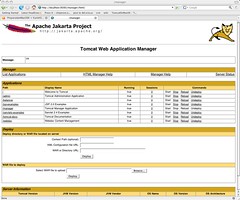
    Open a browser and type http://localhost:8080 to see a Tomcat welcome screen.

    In the final step, I modified conf/server.xml. Luckily I had my Windows setup to refer back to, or I would have been really lost at this stage…

    tomcat

  • White Space

    (half-geek plans)

    Maybe I’ll try out this WordPress theme over the weekend:
    Whitespace WordPress Theme

    And I’ve still got to figure out how to install and configure a Tomcat on a Mac.

    And I still want to install MacFuse and MacFusion

  • Bush League

    Interesting read:

    Cy on his Malawi experiences

    The contrast between rural and urban areas in Malawi is huge. I remember an article I read (probably The Nation or The Daily Times) during my last stay, on how people in a remote village in the northern region near Rumphi can get reception for their mobile phones if they climb a certain ant hill. There was a photo of a group of people with a solar panel. And somebody was quoted as saying how this is improving communication with family members all over the world.

    (BTW, if anybody in Malawi remembers this article and has access to the archives, I’d appreciate a digital copy. Should be an issue in Feb or March 2007… i’m asking for the impossible)

  • Embedding Google Video and Autoplay

    quick note:
    If you’re embedding a Google Video and you don’t want the video to start automatically, check the embed code for flashvars="autoPlay=true" and delete it…

  • Not new

    At Lift 07 there was a panel on technological overload. The video of the panel is available here.

    Update: Since Google Video is no more, the video can be viewed on Vimeo

    Panel Discussion:Dealing with technological overload (Lift07 EN) from Lift Conference on Vimeo.

    Fellow blogger Mlle. A. pointed out that this kind of discussion isn’t new.

    A couple of days ago she sent in an article by Ann Blair on “Reading Strategies for Coping with Information Overload ca. 1550-1700” published in 2003 in the Journal of the History of Ideas.

    As more and more books were published, academics worried about keeping up: they discussed the effects of reading manuals and encyclopedias or reading “only in parts”. And discussed strategies to classify information, added indexes and used cut and paste to arrange the information they received.

    Blogging isn’t new either:

    “Reading is useless, vain and silly when no writing is involved, unless you are reading (devotionally) Thomas a Kempis or some such. Although I would not want even that kind of reading to be devoid of all note taking.”

    Interesting stuff.

  • GIMP and GraphicConverter and more

    The newness of my MacBook is decreasing rapidly. I’ve installed GIMP (works nice and zippy), GraphicConverter (useful for quick resizing of images), TextWrangler (an editor), MS Office 2004 (although I’m considering to install NeoOffice and use MS Office via Parallels only).

    I had a look at the websites of Scribus and Inkscape, but I think I’ll wait before installing them.

    I’ve installed the Subversion command line client and a little plugin (aargh, can’t remember the name) that allows you to upload and commit files from the finder. I didn’t like SvnX much.

    I like the size of my MacBook. Much easier to lug around. Quicksilver is very useful.

    (update) The SVN plugin is called SCPlugin.

  • CVS and CVL and others

    Here are some quick notes on installing a CVS client on my MacBook (for my own future reference):

    1. Install CVS, if you haven’t done so already. It’s part of the Apple developer tools on Mac OS X Install Disc 1 called XcodeTools. To test if it’s installed, open Terminal and type cvs to get a typical Unix app welcome screen.
    2. Install a GUI for CVS. I’m trying out CVL which is available for download here.
    3. Select Tools > Repositories. Click New… and add your CVS repository details.
    4. Click Modules to see all CVS modules available to you.
    5. Click Checkout… to get a local copy of the CVS files.

    ਠvoila. A console window shows the files being checked out to your hard disk. Work Area shows you an overview of the new or modified files.

    First impression: It’s more like WinCVS and less like TortoiseCVS.

    Disclaimer: I’m a low and humble content developer and use CVS and Subversion for versioning at my day job. If I get something very wrong or if you have useful tips, please leave a comment. I’m moving from Windows to Mac and documenting my experience.

    Regarding version control:
    I used an older version of Visual Sourcesafe a couple of years ago and IMHO, CVS and Subversion are easier to use once you’ve got past the install hurdle. Subversion’s next on my install list.

    SSH is pre-installed on the Mac: Open Terminal and type ssh followed by your username@hostname.

    As you can see I’m having a lot of fun.

  • Mon Mac à  moi

    My new MacBook arrived last Monday. And I’ve started installing software and exploring. Slowly. A new laptop is like getting a new exercise book at school. An empty book equals an empty hard disk. And a new operating system is a new learning experience.

    Software installed so far:

    • Firefox and Thunderbird
    • The latest version of Safari
    • Quicksilver – looks like a really powerful tool. There’s a whole series of articles at Lifehacker.
    • Cyberduck
    • Parallels and MS Office 2000 for Windows
    • Skype
    • Canon digicam software – ImageBrowser, EOS Utility, CameraWindow
    • Flickr Uploadr – I’m missing some kind of integration into a file viewer and the possibility to rotate imgs before uploading them. Any tips regarding a photo viewer with integrated Flickr upload functionality? Would be cool if I could use Flickr upload functions in an image browser. What are you using?

    And here’s the list that I’ll still need to add:

    • Subversion and CVS tools
    • GraphicConverter (by Lemke Software)
    • MAMP or XAMP for Mac (see also this thread at Metablog.ch)
    • Tomcat
    • GIMP
    • TextWrangler
    • TextMate (maybe)
    • NeoOffice (maybe)

    I found some useful articles at Tao of Mac, which I’d like to share:

    BTW, I’m planning to set up an Ubuntu laptop soon… on a separate machine.

    Photo credit

  • Content drives action

    reading

    I started reading “The new rules of Marketing and PR” yesterday, and I like it. I’m at Chapter 3, and so far it’s a good summary of things I’ve discovered. Reinforcing experiences which I’ve been calling Low Budget Internet Marketing.

    A couple of notes:

    • Today’s search engine setup means you can reach buyers directly.
    • One-way interruption advertising is over.
    • Good content will help buyers decide. There’s people like you and me that do their own research and consider a decision over a period of time before buying.
    • There’s a “long tail” effect for news announcements as well.
    • The lines between PR and marketing are blurry.

    Meerman’s right about the way consumers and buyers do their own research, ignoring the advertising to a large extent. And evaluating on their own. Take me as an example: I’m in the marketplace looking for an entry-level DSLR and I’m reading review sites, asking questions, watching the news and prices.

    (Yes. My evaluation process is long. And I overdo it sometimes. But then I’ve been working in IT for the past 9-10 years. 6 months minimum.)

    The Learning Effect of Blogging:
    There’s one effect I’d like to highlight: by setting up my own blog, posting short tumble blog-like entries, and keeping track of a couple of marketing bloggers, the new rules aren’t that new to me. Blogging is a great way to learn. Instead of watching from the sidelines, my advice is to dive in.

    I’ll try to post a summary as I go along… Mlle. A. is reading the same book. Between the two of us, we’ll get some two-way discussion going. Feel free to join us.

  • Twitter Clients

    Drinking coffee and listening to Scoble’s video on Twitter.

    For future reference ( or never 😉 cos I don’t feel like installing any of these now):
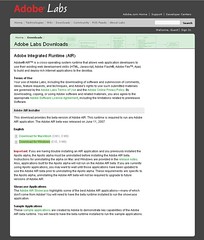
    There’s a desktop client for Twitter called Spaz. Downside: you need to download 9 megs of Adobe AIR beforehand.

    adobe_air

    Twitter.pbwiki.com lists a long list of Twitter apps.

    Here’s a description how to set up TwitterVision as your Windows XP desktop.

  • Login and password nightmare

    Just a note to say that we need to find a better solution for this login and password nightmare called Web 2.0.

    I can’t say how many times I’ve left a website without leaving a comment ‘cos I had to login to leave a comment…

    And another Web 2.0 feature request: please offer some kind of Delete my account option.

    facebook

    Somewhat related:
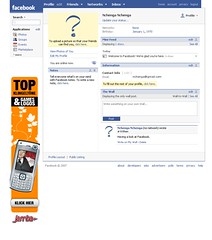
    One of the reasons I don’t like Facebook: Walls. And tonnes of dialog boxes asking me to confirm my choices. All the time.

    (update) there’s a post about Facebook’s walled gardens.

  • Adding the SEO Title Tag plugin

    Here are my short notes on new WordPress plugins I’m trying out at Chiperoni.ch:

    SEO Title Tag

    I read about this in a WordCamp 2007 report last weekend. The corresponding plugin web page is here.

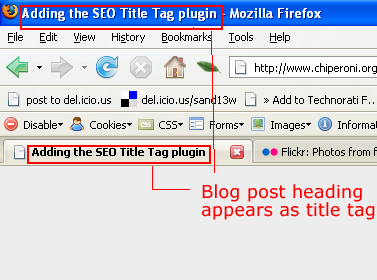
    If you’re using K2, open header.php and replace everything within the title tag with this:

    < ?php if (function_exists('seo_title_tag')) { seo_title_tag(); } else { wp_title(''); ?> < ?php if ( !(is_404()) && (is_single()) or (is_page()) or (is_archive()) ) { ?> at < ?php } ?> < ?php bloginfo('name'); } ?>

    e voilà :

    adding the seo title tag

    Bad behavior

    According to the website:

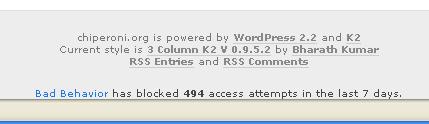
    Bad Behavior complements other link spam solutions by acting as a gatekeeper, preventing spammers from ever delivering their junk, and in many cases, from ever reading your site in the first place. This keeps your site’s load down, makes your site logs cleaner, and can help prevent denial of service conditions caused by spammers.

    And yes, my logs are cleaner. Less spam is slipping thru into the comment moderation queue.

    Bad behavior

    Stats plugin

    I’ve been using Counterize II for a couple of months and can recommend it.

    If you’re in a hosted setup like WordPress.com, you could use a service like Sitemeter, Statcounter, or Google Analytics.

  • MacBook salad

    I’ve decided to move to Mac… and I’ve been asking other Mac users for tips regarding software. And the list is long.

    Photo credit