
Blog
-
How to Resize Photos
My family’s email account in Blantyre was blocked twice in the past week, due to well-meaning but over-sized Christmas and New Year email greetings. Attachments with over 2 MBs. The family is still on a phone line with a very slow connection rate. And downloading emails with a large attachment takes forever and a day. Luckily I can access their account via the web and move the large emails out of the way. But I thought I’d raise some awareness.
And point you to some resources describing how to resize photos.
Using MS PaintHow to resize your photograph by exact dimensions
- Right click on the image and select ‘Edit’. (This should bring up Windows Paint).
- On the menu bar at the top, select Image -> Attributes…
- If the image is a portrait layout, use a width of 640 and a height of 480. If it’s a landscape layout, use a width of 480 and a height of 640.
- Save the file. (You may want to ‘Save As’ to a different file so you don’t overwrite the original).
How to resize your photograph by percent
- Right click on the image and select ‘Edit’. (This should bring up Windows Paint).
- On the menu bar at the top, select Image -> Stretch/Skew…
- Change the percentages in the Stretch box for both Vertical and Horizontal. Make them both the same or else the picture will not be proportionate.
- Save the file (you may want to ‘Save As’ to a different file so you don’t overwrite the original).
Using Picasa
Resize by exporting
Exporting lets you resize your photos while controlling the JPEG compression (image quality) introduced by your applied photo edits. The result is newly resized copies of your photos, saved to any location on your hard drive. During the export process, you can adjust both the ‘Image Size Options’ and the ‘Image Quality’ settings in the ‘Export to Folder’ screen.
- Under ‘Image Size Options,’ select the ‘Resize to’ option and adjust the size slider. The number of pixels you select with this slider determines the length or height of your photo (whichever is longer). The other dimension is determined automatically to maintain the aspect ratio of the photo.
- Select the desired image quality for your photo using the ‘Image Quality’ drop-down menu:
- Automatic: Preserves the original image quality
- Normal: Balances quality and size
- Maximum: Preserves fine detail for large file sizes
- Minimum: Yields some quality loss for small file sizes
- Custom: Enables you to select your own value
Resize by emailing
If you’re sending photos by email, you may want to resize then in order to get under the attachment size limitation. To change the size of the photos you email from Picasa, please follow these steps:
- Click the Tools menu.
- Select Options.
- Click the Email tab.
- Under ‘Output Options,’ use the slider to set your desired pixel size when emailing multiple photos. Use the radio buttons to set the desired pixel size for emailing single photos.
- Click OK.
Lazy workaround via Flickr
I sometimes use Flickr as a lazy workaround.
- Upload or email photo to the Flickr stream.
- Go to the photo page and select All Sizes.
- Select Small or Medium and click Download the Small (or Medium) Size.
File format:
Always use JPEG.There are tonnes of other ways to resize photos with free software, such as IrfanView or The Gimp.
Within MS Word:
Don’t change the viewable size within Word (e.g. dragging the corners of the photo). Word will store the image in its original size. Resize the photo before inserting it into Word.Adobe PDF:
Check the conversion settings.Check the sizes of all files (Word, pdf, .jpeg) before sending them.
Be considerate and don’t send photos in their original size. Especially if you don’t know what type of connection the recipient is using.
It’s five minutes for you versus 30 minutes of expensive download time on a plain old telephone connection for them.
-
The Sunday before Christmas
The jog log:
Slow but steep run to Bettingen (the long way) through slush, mud and melted snow. The temperature was around 5 to 8 degrees plus. Perfect running weather. The soles of my feet were burning for much of the way. Maybe the wrong pair of socks…? But I kept going and feel relaxed now.
Here’s a quote I heard today at Crossroads from Robert Fulgham’s book “All I Really Need to Know I Learned in Kindergarten”, a book I read many years ago:
All I really need to know about how to live and what to do and how to be I learned in kindergarten. Wisdom was not at the top of the graduate school mountain, but there in the sand pile at school.
These are the things I learned:- Share everything.
- Play fair.
- Don’t hit people.
- Put things back where you found them.
- Clean up your own mess.
- Don’t take things that aren’t yours.
- Say you’re sorry when you hurt somebody.
- Wash your hands before you eat.
- Flush.
- Warm cookies and cold milk are good for you.
- Live a balanced life – learn some and think some and draw and paint and sing and dance and play and work every day some.
- Take a nap every afternoon.
- When you go out in the world, watch out for traffic, hold hands and stick together.
- Be aware of wonder. Remember the little seed in the Styrofoam cup: the roots go down and the plant goes up and nobody really knows how or why, but we are all like that.
- Goldfish and hamsters and white mice and even the little seed in the Styrofoam cup – they all die. So do we.
- And then remember the Dick-and-Jane books and the first word you learned – the biggest word of all – LOOK.
Everything you need to know is in there somewhere. The Golden Rule and love and basic sanitation. Ecology and politics and equality and sane living.
Take any one of those items and extrapolate it into sophisticated adult terms and apply it to your family life or your work or government or your world and it holds true and clear and firm. Think what a better world it would be if we all – the whole world – had cookies and milk at about 3 o’clock in the afternoon and then lay down with our blankies for a nap. Or if all governments had as a basic policy to always put things back where they found them and to clean up their own mess.
And it is still true, no matter how old you are, when you go out in the world, it is best to hold hands and stick together.BTW, Crossroads was beautifully decorated today:

Compare and contrast these to the 3-meter-high plants in our garden in Nyambadwe last May:


My year of photography:
The Malawi plants are some of my first photos I took with my Canon 40D. I bought the dslr shortly before flying to Blantyre. I have had a lot of fun and look forward to learning more.I’m planning to get a tripod very soon.
I may sound kind of spaced out/weird/disconnected, but taking photos has a therapeutic effect on me. A way to be creative and express myself. To de-stress. To reflect.
-
RSS Feeds
Here are a couple of links in preparation for a meeting tomorrow where I get to explain how I use RSS feeds.
What is an RSS Feed?
- Definition: Wikipedia has a good overall description.
There’s a video explaining RSS feeds in plain English:
How do I use RSS feeds?
- To follow niche topics: to keep up with news and topics that I am interested in. My advice: don’t subscribe to any high-volume news feeds like CNN or the BBC. Use it to stay up-to-date on topics that you are following regularly, e.g. I’ve subscribed to a number of websites that write about technology in Africa.
- As a single-source input base with endless distribution possibilities: I can distribute and cross-reference items on other websites of mine using RSS. For example, I can display my latest Chiperoni.ch entry at another website and vice versa. WordPress, the web technology I use at this site, offers RSS feeds for comments, categories and tags. For example the RSS feed address for entries categorized as Malawi is: http://www.chiperoni.ch/wordpress/category/malawi/feed/
This is a simple but great way to make a website more dynamic. See also my recent prototype.
Advantages versus a regular email newsletter:
- I can easily unsubscribe a feed, if I want (less hassle than email newsletter).
- I can decide in what intervals I would like to receive updates.
- I can choose where I want to read a feed (in a desktop reader, in my email inbox or in web-based tool).
- I can subscribe to an RSS feed via email.
Tools:
I currently use Google Reader, a web-based feed reader. I have used dedicated desktop feed readers, other web-based tools, and the feed reader of Mozilla Thunderbird and Apple Mail. My preferences change from time to time. A web-based reader has the advantage of being accessible where ever I have Internet access and a browser. Email clients are great for a corporate environment.
More on Google Reader:
I can share, email or tag an entry within my RSS reader:
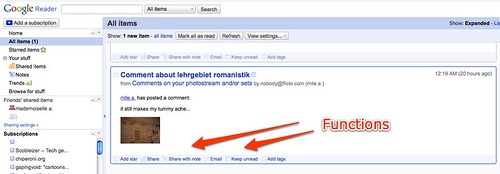
What else? Feel free to comment and describe your usage, while I catch some sleep.
-
shadow on the wall

Photo walking is more fun when conditions are not quite as cold as yesterday (about 3 degrees plus and windy).
Older snapshot from a recent trip to Hannover:

-
Snow
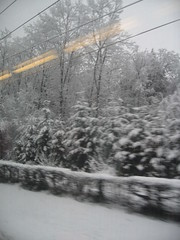
Still find snow exciting. Like a little kid. Frozen water falling from the sky.
The tag: living in a deep freezer
-
Running Tips for the Cold Season

The transition from European autumn to winter still isn’t easy for this Malawi-born blogger. Even after so many years. I find it’s more difficult to go out running when it’s raining, windy and icy cold. But just like with warm weather, running outside is a good way to get accustomed to the cold season. And it can be very refreshing to have fresh, crisp December air rushing into your system.
Here are a couple for tips:
- Layers Wear 2 or 3 layers, so that you can remove a layer or two once you feel warm.
- Gloves and a beanie Wear gloves and a beanie to keep your hands and head warm.
- Breathing If temperatures drop below zero, breathing can be difficult and can cause a stabbing pain in your lung area. Start running slowly, close your mouth and breathe through your nose to warm the air before it hits your lungs. Usually the stabbing pain stops after a couple of minutes. If it doesn’t, it’s probably time for the indoor tread mill.
- Change your schedule On the weekends I run during the early afternoons, while it is light. And I try different routes.
- Join a running group Meeting with others helps to stay motivated. Sometimes.
I’m writing these tips for myself, ‘cos that special German phenomenon called innere Schweinehund (literally inner pig dog) has been creeping in.
This afternoon I ran for about an hour from Riehen up to Bettingen. After about 5 minutes I started feeling warm, and when I reached Bettingen I saw a beautiful view of the Black Forest mountains. I ended my run with some stair exercises. And now I’ve got something to write about. To show off. Priceless.
-
Ten Differences between Skype and Twitter
On the train to northern Germany. Three more hours to go.
It’s been a long day and my motivation to get some work done is kind of missing. So here’s a text message from the train. Longer than 140 characters. Maybe.
Two doctors across the aisle are loudly discussing other doctors, Basel hospitals, the Swiss health system, politics and other details. They are code switching between Swiss German and Arabic (or something that sounds similar). They are getting out now. They were talking non-stop for two hours.
Der Trend zu mehr als einem Betriebssystem:
BTW, I finally ordered a new 13 inch MacBook with 4GB RAM. I really like the size. I guess I am officially a Mac fan. I even tweeted about it!Twitter vs. Skype:
How do you explain the difference between Twitter and Skype? I was talking about the Twitter Dinner I attended on Monday and a work colleague asked “What’s the difference to instant messaging?”For the casual observer, none really. Nothing revolutionary. 140 characters organized chronological on a webpage. Like the first webpages, nothing truly spectacular.
Yet again, it is another way to publish even faster. Faster than a static HTML-based webpage or a dynamic server-side based blog.
The future of Twitter will be exciting to watch. Maybe it will just dwindle and die. Maybe new business models will emerge and it will become commercial like websites. Maybe it’s just a stepping stone to something new.
Anyway here we go, my first list in a long time. Here are:
Ten differences between Skype and Twitter:
- One to many vs one to one or one to two: I have more Twitter followers than Skype contacts. I don’t follow all of my Twitter followers, while Skype is more or less reciprocal and if somebody doesn’t add me as a contact, I start wondering why.
- Public With Twitter I can view the stream, and the faves before clicking the ominous Follow button. By default Skype messages are not public.
- More options Skype is direct and immediate between me and another person or a second person. Twitter can be direct and immediate between my friends and me, but it doesn’t have to be. I can post a tweet message without any follow-up or call to action. On the other hand Skypers expect a more immediate reaction. And tend to follow general conversational patterns.
- Easier to search thru I can search thru Tweet streams much more easily, thanks to add-on services such as Twitter Search/Summize.
- Monitor Like with Google, or Flickr, I use Summize/Twitter Search to find new content on topics of interest, c.f comments on the famous Nutella Alternatives group (funny!) or on a more serious note tweets from Malawi and Zimbabwe. In the same way, companies can find what people are saying about their products. Consumers are more likely to write a 140 character message than a full A4 review on your product. I.e. Twitter forms opinions on products. And unlike statements at a cocktail party, these mini-reviews are searchable.
- Unfiltered news from strangers With Twitter I can get raw, unfiltered messages on current news as they happen, c.f the recent bombings in Mumbai. Following “breaking news” on Twitter is more exciting than on CNN and co, as they scramble to get a correspondent online and show the same video sequence over and over again.
- Mobile Cos it’s so simple, Twitter offers better mobile phone integration from the start. Unfortunately, the best Twitter feature by far was shut down in September 08. What I call the downstream, i.e. the forwarding of Twitter messages to my cell phone.
- Ubiquituous software All I need is a browser and my login data. And browsers are everywhere. I think there’s a possibility to use a Skype widget within a browser, but so far I have never used this feature.
- Faves I can store Twitter messages I like by fav’ing them.
- Fun I use Skype for work-related stuff. Twitter is for fun. I’m not twittering for the marketing effect. Just fun. I don’t care if 1000 people follow me or not.
And finally it’s art:
I learnt at LIFT 08, that I’m part of a giganormous art project.Where else can you follow the different time zones having their first cup of coffee in the morning?
-
Late Nite Prototyping
(work in progress, here’s a provisional brain dump)
Quick test install to demonstrate how WordPress can be used for a corporate newsroom:
(Update – 3rd November 2009 – Note from the Editor:
The prototype has been discontinued – but rest assured that the knowledge is still available)The main page shows all news in chronological order.
Categories classify the various entries: press release, events, newsletter, industry sector…etc.
A click on category shows all items for that category, e.g. all events.
RSS feed for a specific category can be displayed on other web pages, external sites or can be subscribed by customers.
Next steps:
Delete blog features that are not needed, e.g. comments.
Change css design to match company corporate design.
é voila! Corporate News 2.0hhhhh
-
Metropole Switzerland
Before I moved to Switzerland I read an article discussing the idea or rather the vision of Switzerland being one metropolitan area with ultra-fast trains zipping to and fro between the commercial centres.
Recently this topic has filtered through to me again. I’m assuming that in a specialized context it has been discussed all along.

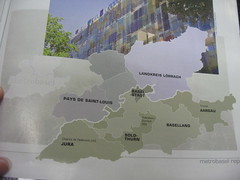
As I mentioned in one of my Flickr comments, the urban area around Basel will probably continue to grow and it would better if cities and towns cooperated on important regional issues such as traffic, public transport, waste disposal, city planning and education.
In October I took part in an interesting architecture tour called Birsstadt, which discussed and highlighted the importance of regional vs town assembly planning and management.
But I’m just a private person noticing a trend and commenting…
-
Lebenszeichen
some personal stuff about me that you don’t want to know:
Two days ago I spilled hot coffee on my laptop keyboard. I feel very stupid. I am mad at myself… my only hope is that the letter m will recover. I am thinking of setting up a Donate button. I didn’t think something so stupid would happen to me.
Feel free to strike me from your feed reader. TBTSCAOTL … The blogger that spilled coffee all over the laptop. Anybody want to start a therapy group?
Change of topic: I have been viewing a couple of apartments ‘cos I’m thinking of moving (happens every winter when the temperatures fall below zero). Two of the three places I viewed are having difficulties with the property managers – very few flats are managed by private persons in the Basel region. At one of the places I viewed, the tenant was called by the landlord while I was there. Disputes the tenants are always very open about. But which will not hurt the property managers ‘cos there is a continuous lack of affordable housing in Basel.
Get informed. Renting a flat is very different to Germany or other places.
There’s a mieterverband for Basel-Stadt that offers infos and legal help.BTW, this blog post is brought to you by the letter m.
-
Reading List
A regular reader of Chiperoni.ch has suggested that I add a book list.
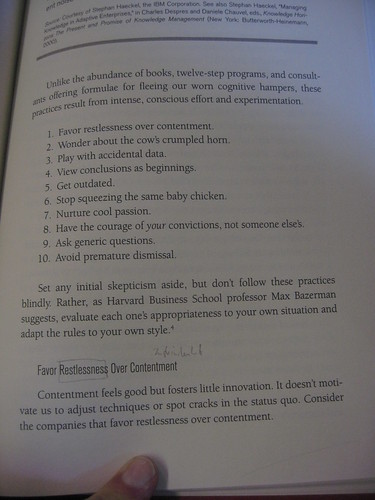
Yesterday I stopped by at the uni library and browsed thru the marketing section. I picked up “How Customers Think” by Gerald Zaltmann. And some pages caught my eye. The 10’000 feet view.
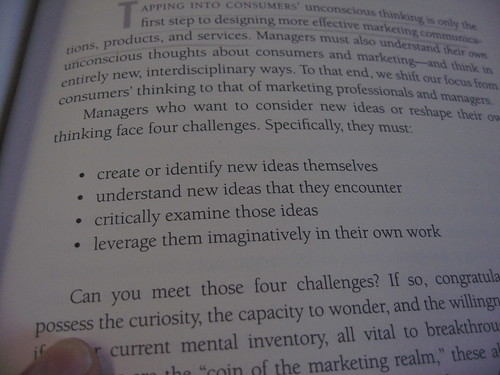
Ways to find original ideas and get out of the customary, surface-oriented thinking about consumers:
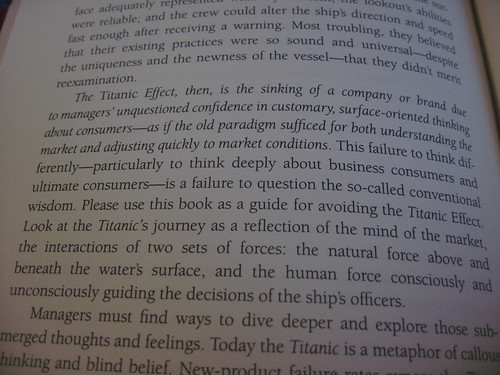
He describes the Titanic Effect here:
Another book I browsed thru is:
“Marketing-Erfolg im Internet” by Martin Blatter-Constantin. It stood out of the crowd ‘cos it offers nifty black and white icons in the left column. And I liked the fact that it talks about personas from the beginning.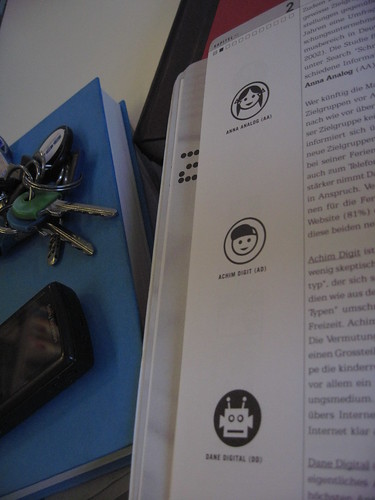
Other books I brought along for reference purposes, include:
- The New Rules of Marketing and PR by David Meerman Scott – a recommended read; I wrote a couple of blog posts here and here.
- Marketing your Business, A Guide to Developing a Strategic Marketing Plan by Ronald A. Nykel – no opinion yet.
Last in today’s list is “The Marketing Mavens” by Noel Capon:
-
Text Snippets Circling Around
Pêle-mêle off the top of my head:
Learnt yesterday:
The number of English-speaking Internet users is decreasing, currently at about 35% of total number of Internet users.Shared yesterday:
Who writes about African technology developments? From the list, I follow White African, Afrigadget, and sometimes Google Alert points me to IT News Africa.Photo processing software for Ubuntu:
I’m currently MacBook-less (there are plans to change this very soon), but in the meantime I’ve installed Ubuntu 8.04 on an Acer Aspire 5920. I tried upgrading to Intrepid Ibex, but I couldn’t get my LAN connection to work. Something to do with the MTU count. And I encountered 2 bugs during the install:- package update-manager 1:0.93.32 failed to install/upgrade: ErrorMessage: SystemError in cache.commit(): E:Sub-process /usr/bin/dpkg returned an error code (1), E:Sub-process /usr/bin/dpkg returned an error code (1)
- package ubuntustudio-menu 0.9 failed to install/upgrade: there is no script in the new version
So I went back to Hardy Heron. Cost: most of my Saturday. Learning effect: priceless.
I’ve been scanning the Internet for Linux photo processing software, besides Gimp, Picasa and F-Spot. ‘Cos so far Canon’s DPP has not been ported to Linux. I guess I could use it via Wine. But between you and me, I’m just looking for a good excuse to get a new MacBook. Beyond that DPP (still) lacks a good straightening tool.
I tried BlueMarine ‘cos it sounded promising, but I quickly gave up. Not usable.
There are a couple of commercial tools to consider:
- LightZone Linux
- Bibble
In the end I tried Raw Therapee and downloaded Qtpfsgui for HDRs. Both of which are free and look promising at this stage.
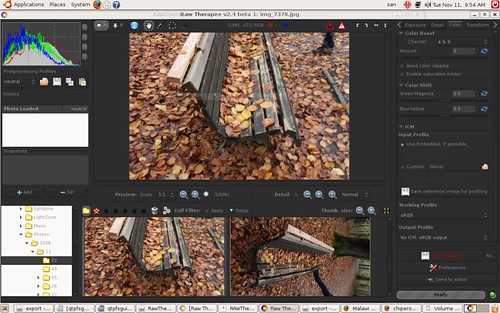
BTW, this blog post is good example how I can trick myself into writing a longer text. Initially, I just wanted to write a few Tweet-like text snippets, a summary of various small items circling around in my head. Pêle-mêle off the top of my head.
Please feel free to comment. I would be very grateful for any Ubuntu tips and tricks, etc.
-
The Fabric of the ‘Net
Kevin Marks picks up the recent meme on blogging being dead/old-fashioned/out-dated. He says:
Blogging…
has become part of the fabric of the net
See these blog posts and articles:
Nick Carr: Who killed the blogosphere?
The Economist: Oh, grow up!Some things don’t change, though. Old and dying media still feel the need to criticize blogs and the authors for not being critical or original enough. Or whatever. Articles like this show a lack of understanding. A recurring theme in old media vs. new media. I write about Google, iPhones, new MacBooks and the US election ‘cos these topics have become part of my life. I’m reflecting. Collecting. Writing. Sharing. Remembering. Learning. Trying out new technology instead of sitting on the sidelines and waiting until it gets mainstream. I’m not a news site. I don’t have a budget. I don’t earn any revenue.
-
Hope
Post-US-election note to myself: Hope is a powerful force.
My mind is jumping here, but…
I’m reminded of this text snippet in a widespread and recognized book of poetry:
Not only so, but we also glory in our sufferings, because we know that suffering produces perseverance; perseverance, character; and character, hope.
Getting up at 4 o’ clock in the morning to study for school may lead to great things.
-
Drip by drip
For future reference:
Marketing is never about a hammer hitting plate glass.
It is almost always about the accrued power of a thousand drips, drips that accrue, drop by drop until they overwhelm the status quo and break through, starting a flood.
The first drip is very exciting, of course. Everyone lines up to cheer.
It’s the last drip that’s lonely. Most of the time, everyone has long left the building, lost interest and moved on to celebrate some other first drip. The penultimate drip gets criticized… are you still working on that?… that’s not so great… is that it?… but then, the drip that comes next, the last drip, proves once and for all that you were doing the right thing all along.
I could write a long blog post on this.
I could sing a reggae song that has the same message.
-
Opening .MHT Files on a Mac
Executive summary:
Best tool to open .mht files on a Mac is Opera for Mac.I regret deleting Windows Vista.
Last week I was sent a .mht file. And now I’m searching the Internet for a solution how to open this proprietary Microsoft file (my perception, but according to Wikipedia it is actually a proposed standard).
MS Word 2004 for Mac said something like this “is not a valid archive”.
I found this forum entry at Mac OS Hints.
The GraphicConverter way didn’t work for me. Only a small graphic file displayed. The rest of the content did not display. BTW, I’m not too fussed about GraphicConverter anyway. Maybe you use GC, if you only want to extract the images…
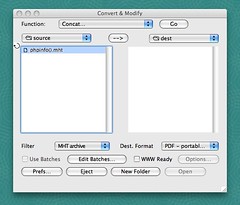
I’d recommend the Stuff It Expander way:
- Get the free version of Stuff It Expander and install it.
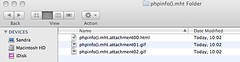
- Drag and drop the .mht file to the Stuff It Expander. Stuff It will create a folder with the same name as your file. Within this folder, there’ll be several files with the endings 00, 01, 02, etc. The first of these files is usually the .html file, while the following are image files.
- Add the ending
.htmlto the file labeled 00 and open with your standard browser… é voilà . Funziona.
Another (probably simpler) way is to get File Juicer.
The easiest way to read .mht files is to install Opera on your Mac. Open the file to see the contents directly. No further renaming or converting required.
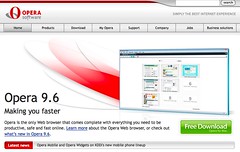
Executive summary:
Best Tool = Opera for Mac -
On Following Tweet Streams
I recently talked to Persillie on the difficulty of following people’s tweet streams. Esp. if you have a limited time budget and can only tune into Twitter every so often.
For example, I follow Kathy Sierra’s stream at Twitter. You can see quite a few of her 140 character statements in my Twitter Favorites.
Re: “PR is Dead?” meme–PR has same issue as UI design: it’s NOT something you can slap on afterward. Must be baked into product.
“Job happiness” should not have a single point of failure… but too often it ALL depends on your current boss. Bad managers REALLY suck.
Things Smart People Do: Martin Fowler (software dev pioneer) said he went to a ‘passionate users’ talk *because* he “doesn’t like the topic”
Powerful template 4 learning: “I will do Project A, to ‘force’ myself to learn Skill B” rather than “I must/will learn Skill B” @hrheingold
PR/marketing should fail when it’s about “getting word out”. If they’re about helping “users kick ass”, we’re good. Less pitch, more teach.
I see a huge overestimation of the importance of “social” in marketing/PR or product dev in general today.
etc, etc…
The difficulty arises when other Twitterers ask questions and Kathy responds. I don’t see the question and it gets much more difficult to follow.
Twitter is like a cocktail party. The music is so loud, sometimes you only hear parts of the answer.
Are there Twitter tools that help with this? The only tool I can think of is Twitter Search (formerly Summize).