Category: General

  • How to Resize Photos

    My family’s email account in Blantyre was blocked twice in the past week, due to well-meaning but over-sized Christmas and New Year email greetings. Attachments with over 2 MBs. The family is still on a phone line with a very slow connection rate. And downloading emails with a large attachment takes forever and a day. Luckily I can access their account via the web and move the large emails out of the way. But I thought I’d raise some awareness.

    And point you to some resources describing how to resize photos.


    Using MS Paint

    How to resize your photograph by exact dimensions

    1. Right click on the image and select ‘Edit’. (This should bring up Windows Paint).
    2. On the menu bar at the top, select Image -> Attributes…
    3. If the image is a portrait layout, use a width of 640 and a height of 480. If it’s a landscape layout, use a width of 480 and a height of 640.
    4. Save the file. (You may want to ‘Save As’ to a different file so you don’t overwrite the original).

    How to resize your photograph by percent

    1. Right click on the image and select ‘Edit’. (This should bring up Windows Paint).
    2. On the menu bar at the top, select Image -> Stretch/Skew…
    3. Change the percentages in the Stretch box for both Vertical and Horizontal. Make them both the same or else the picture will not be proportionate.
    4. Save the file (you may want to ‘Save As’ to a different file so you don’t overwrite the original).

    Using Picasa

    Resize by exporting

    Exporting lets you resize your photos while controlling the JPEG compression (image quality) introduced by your applied photo edits. The result is newly resized copies of your photos, saved to any location on your hard drive. During the export process, you can adjust both the ‘Image Size Options’ and the ‘Image Quality’ settings in the ‘Export to Folder’ screen.

    • Under ‘Image Size Options,’ select the ‘Resize to’ option and adjust the size slider. The number of pixels you select with this slider determines the length or height of your photo (whichever is longer). The other dimension is determined automatically to maintain the aspect ratio of the photo.
    • Select the desired image quality for your photo using the ‘Image Quality’ drop-down menu:
      • Automatic: Preserves the original image quality
      • Normal: Balances quality and size
      • Maximum: Preserves fine detail for large file sizes
      • Minimum: Yields some quality loss for small file sizes
      • Custom: Enables you to select your own value

    Resize by emailing

    If you’re sending photos by email, you may want to resize then in order to get under the attachment size limitation. To change the size of the photos you email from Picasa, please follow these steps:

    1. Click the Tools menu.
    2. Select Options.
    3. Click the Email tab.
    4. Under ‘Output Options,’ use the slider to set your desired pixel size when emailing multiple photos. Use the radio buttons to set the desired pixel size for emailing single photos.
    5. Click OK.

    Lazy workaround via Flickr

    I sometimes use Flickr as a lazy workaround.

    1. Upload or email photo to the Flickr stream.
    2. Go to the photo page and select All Sizes.
    3. Select Small or Medium and click Download the Small (or Medium) Size.

    File format:
    Always use JPEG.

    There are tonnes of other ways to resize photos with free software, such as IrfanView or The Gimp.

    Within MS Word:
    Don’t change the viewable size within Word (e.g. dragging the corners of the photo). Word will store the image in its original size. Resize the photo before inserting it into Word.

    Adobe PDF:
    Check the conversion settings.

    Check the sizes of all files (Word, pdf, .jpeg) before sending them.

    Be considerate and don’t send photos in their original size. Especially if you don’t know what type of connection the recipient is using.

    It’s five minutes for you versus 30 minutes of expensive download time on a plain old telephone connection for them.

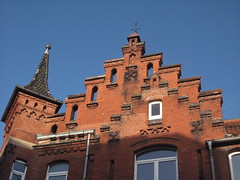
  • I like red brickwork


    New year photo resolution:

    Take a camera everywhere I go.

  • The Sunday before Christmas

    The jog log:
    Slow but steep run to Bettingen (the long way) through slush, mud and melted snow. The temperature was around 5 to 8 degrees plus. Perfect running weather. The soles of my feet were burning for much of the way. Maybe the wrong pair of socks…? But I kept going and feel relaxed now.

    IMG_8185

    Here’s a quote I heard today at Crossroads from Robert Fulgham’s book “All I Really Need to Know I Learned in Kindergarten”, a book I read many years ago:

    All I really need to know about how to live and what to do and how to be I learned in kindergarten. Wisdom was not at the top of the graduate school mountain, but there in the sand pile at school.
    These are the things I learned:

    • Share everything.
    • Play fair.
    • Don’t hit people.
    • Put things back where you found them.
    • Clean up your own mess.
    • Don’t take things that aren’t yours.
    • Say you’re sorry when you hurt somebody.
    • Wash your hands before you eat.
    • Flush.
    • Warm cookies and cold milk are good for you.
    • Live a balanced life – learn some and think some and draw and paint and sing and dance and play and work every day some.
    • Take a nap every afternoon.
    • When you go out in the world, watch out for traffic, hold hands and stick together.
    • Be aware of wonder. Remember the little seed in the Styrofoam cup: the roots go down and the plant goes up and nobody really knows how or why, but we are all like that.
    • Goldfish and hamsters and white mice and even the little seed in the Styrofoam cup – they all die. So do we.
    • And then remember the Dick-and-Jane books and the first word you learned – the biggest word of all – LOOK.

    Everything you need to know is in there somewhere. The Golden Rule and love and basic sanitation. Ecology and politics and equality and sane living.

    Take any one of those items and extrapolate it into sophisticated adult terms and apply it to your family life or your work or government or your world and it holds true and clear and firm. Think what a better world it would be if we all – the whole world – had cookies and milk at about 3 o’clock in the afternoon and then lay down with our blankies for a nap. Or if all governments had as a basic policy to always put things back where they found them and to clean up their own mess.

    And it is still true, no matter how old you are, when you go out in the world, it is best to hold hands and stick together.

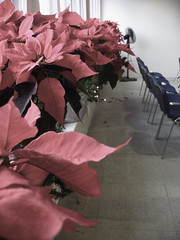
    BTW, Crossroads was beautifully decorated today:

    poinsettas at crossroads basel

    Compare and contrast these to the 3-meter-high plants in our garden in Nyambadwe last May:

    IMG_0146

    more of the same

    My year of photography:
    The Malawi plants are some of my first photos I took with my Canon 40D. I bought the dslr shortly before flying to Blantyre. I have had a lot of fun and look forward to learning more.

    I’m planning to get a tripod very soon.

    I may sound kind of spaced out/weird/disconnected, but taking photos has a therapeutic effect on me. A way to be creative and express myself. To de-stress. To reflect.

  • RSS Feeds

    Here are a couple of links in preparation for a meeting tomorrow where I get to explain how I use RSS feeds.

    What is an RSS Feed?

    There’s a video explaining RSS feeds in plain English:

    How do I use RSS feeds?

    1. To follow niche topics: to keep up with news and topics that I am interested in. My advice: don’t subscribe to any high-volume news feeds like CNN or the BBC. Use it to stay up-to-date on topics that you are following regularly, e.g. I’ve subscribed to a number of websites that write about technology in Africa.
    2. As a single-source input base with endless distribution possibilities: I can distribute and cross-reference items  on other websites of mine using RSS. For example, I can display my latest Chiperoni.ch entry at another website and vice versa.  WordPress, the web technology I use at this site,  offers RSS feeds for comments, categories and tags. For example the RSS feed address for entries categorized as Malawi is: http://www.chiperoni.ch/wordpress/category/malawi/feed/
      This is a simple but great way to make a website more dynamic. See also my recent prototype.

    Advantages versus a regular email newsletter:

    • I can easily unsubscribe a feed, if I want (less hassle than email newsletter).
    • I can decide in what intervals I would like to receive updates.
    • I can choose where I want to read a feed (in a desktop reader, in my email inbox or in web-based tool).
    • I can subscribe to an RSS feed via email.

    Tools:

    I currently use Google Reader, a web-based feed reader. I have used dedicated desktop feed readers, other web-based tools, and the feed reader of Mozilla Thunderbird and Apple Mail. My preferences change from time to time. A web-based reader has the advantage of being accessible where ever I have Internet access and a browser. Email clients are great for a corporate environment.

    More on Google Reader:

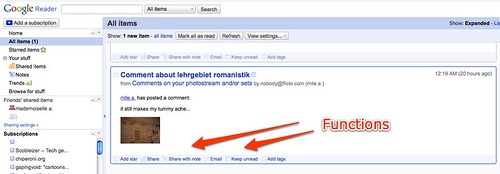
    I can share, email or tag an entry within my RSS reader:

    Google Reader (1)

    What else? Feel free to comment and describe your usage, while I catch some sleep.

  • shadow on the wall


    Photo walking is more fun when conditions are not quite as cold as yesterday (about 3 degrees plus and windy).

    Older snapshot from a recent trip to Hannover:

    getting cold feet

  • SMS for Rural Health Service in Malawi

    Before I rush into my busy day:

    CNN has published an article on Josh Nesbit’s project at St. George’s in Namitete, Malawi. I wrote about the project here and talked about it at BlogCampSwitzerland.

  • Ten Differences between Skype and Twitter

    On the train to northern Germany. Three more hours to go.

    It’s been a long day and my motivation to get some work done is kind of missing. So here’s a text message from the train. Longer than 140 characters. Maybe.

    Two doctors across the aisle are loudly discussing other doctors, Basel hospitals, the Swiss health system, politics and other details. They are code switching between Swiss German and Arabic (or something that sounds similar). They are getting out now. They were talking non-stop for two hours.

    Der Trend zu mehr als einem Betriebssystem:
    BTW, I finally ordered a new 13 inch MacBook with 4GB RAM. I really like the size. I guess I am officially a Mac fan. I even tweeted about it!

    Twitter vs. Skype:
    How do you explain the difference between Twitter and Skype? I was talking about the Twitter Dinner I attended on Monday and a work colleague asked “What’s the difference to instant messaging?”

    For the casual observer, none really. Nothing revolutionary. 140 characters organized chronological on a webpage. Like the first webpages, nothing truly spectacular.

    Yet again, it is another way to publish even faster. Faster than a static HTML-based webpage or a dynamic server-side based blog.

    The future of Twitter will be exciting to watch. Maybe it will just dwindle and die. Maybe new business models will emerge and it will become commercial like websites. Maybe it’s just a stepping stone to something new.

    Anyway here we go, my first list in a long time. Here are:

    Ten differences between Skype and Twitter:

    1. One to many vs one to one or one to two: I have more Twitter followers than Skype contacts. I don’t follow all of my Twitter followers, while Skype is more or less reciprocal and if somebody doesn’t add me as a contact, I start wondering why.
    2. Public With Twitter I can view the stream, and the faves before clicking the ominous Follow button. By default Skype messages are not public.
    3. More options Skype is direct and immediate between me and another person or a second person. Twitter can be direct and immediate between my friends and me, but it doesn’t have to be. I can post a tweet message without any follow-up or call to action. On the other hand Skypers expect a more immediate reaction. And tend to follow general conversational patterns.
    4. Easier to search thru I can search thru Tweet streams much more easily, thanks to add-on services such as Twitter Search/Summize.
    5. Monitor Like with Google, or Flickr, I use Summize/Twitter Search to find new content on topics of interest, c.f comments on the famous Nutella Alternatives group (funny!) or on a more serious note tweets from Malawi and Zimbabwe. In the same way, companies can find what people are saying about their products. Consumers are more likely to write a 140 character message than a full A4 review on your product. I.e. Twitter forms opinions on products. And unlike statements at a cocktail party, these mini-reviews are searchable.
    6. Unfiltered news from strangers With Twitter I can get raw, unfiltered messages on current news as they happen, c.f the recent bombings in Mumbai. Following “breaking news” on Twitter is more exciting than on CNN and co, as they scramble to get a correspondent online and show the same video sequence over and over again.
    7. Mobile Cos it’s so simple, Twitter offers better mobile phone integration from the start. Unfortunately, the best Twitter feature by far was shut down in September 08. What I call the downstream, i.e. the forwarding of Twitter messages to my cell phone.
    8. Ubiquituous software All I need is a browser and my login data. And browsers are everywhere. I think there’s a possibility to use a Skype widget within a browser, but so far I have never used this feature.
    9. Faves I can store Twitter messages I like by fav’ing them.
    10. Fun I use Skype for work-related stuff. Twitter is for fun. I’m not twittering for the marketing effect. Just fun. I don’t care if 1000 people follow me or not.

    And finally it’s art:
    I learnt at LIFT 08, that I’m part of a giganormous art project.

    Where else can you follow the different time zones having their first cup of coffee in the morning?

  • The Fabric of the ‘Net

    Kevin Marks picks up the recent meme on blogging being dead/old-fashioned/out-dated. He says:

    Blogging…

    has become part of the fabric of the net

    See these blog posts and articles:
    Nick Carr: Who killed the blogosphere?
    The Economist: Oh, grow up!

    Some things don’t change, though. Old and dying media still feel the need to criticize blogs and the authors for not being critical or original enough. Or whatever. Articles like this show a lack of understanding. A recurring theme in old media vs. new media. I write about Google, iPhones, new MacBooks and the US election ‘cos these topics have become part of my life. I’m reflecting. Collecting. Writing. Sharing. Remembering. Learning. Trying out new technology instead of sitting on the sidelines and waiting until it gets mainstream. I’m not a news site. I don’t have a budget. I don’t earn any revenue.

  • Hope

    Post-US-election note to myself: Hope is a powerful force.

    My mind is jumping here, but…

    I’m reminded of this text snippet in a widespread and recognized book of poetry:

    Not only so, but we also glory in our sufferings, because we know that suffering produces perseverance; perseverance, character; and character, hope.

    Getting up at 4 o’ clock in the morning to study for school may lead to great things.

  • Drip by drip

    For future reference:

    Marketing is never about a hammer hitting plate glass.

    It is almost always about the accrued power of a thousand drips, drips that accrue, drop by drop until they overwhelm the status quo and break through, starting a flood.

    The first drip is very exciting, of course. Everyone lines up to cheer.

    It’s the last drip that’s lonely. Most of the time, everyone has long left the building, lost interest and moved on to celebrate some other first drip. The penultimate drip gets criticized… are you still working on that?… that’s not so great… is that it?… but then, the drip that comes next, the last drip, proves once and for all that you were doing the right thing all along.

    I could write a long blog post on this.

    I could sing a reggae song that has the same message.

  • Blogging is so 2004

    Blogging is so 2004

    LOL at this Wired article!

    Thinking about launching your own blog? Here’s some friendly advice: Don’t. And if you’ve already got one, pull the plug.

    I agree with the author. Blogging is so 2004. For the record: I installed WordPress on this server in September 2004. Time to pull the plug.

    Follow me on Twitter, Facebook and Flickr instead.


    (BTW I’m still the top entry at Google for Boring Flower Snapshot)

    be bold, be strong!

    😉

  • Portes Ouvertes this weekend

    Last minute pointer:

    Kunstschaffende aus Basel und der Region öffnen alle zwei Jahre an einem Wochenende ihre Ateliertüren, um einem interessierten Publikum Einblick in ihr Schaffen zu gewähren.

    Portes Ouvertes is happening this weekend. Various Basel artists are taking part. A great way to see how artists work.

    Hat tip: Martin Gyger, who is also taking part.

  • From Riehen to Grenzach Wyhlen

    Here are the snapshots of the second architecture tour that I took part in:

    We cycled from Tinguely Museum in Basel and stopped at various points in Riehen and Grenzach Wyhlen.

    Heard about Hans Bernoulli and his Garden City idea to provide improved housing for the working class as well as a patch of ground to grow vegetables and fruit. The wooden houses he built in the Landauer Quartier are apparently still in a good condition. The lease for the Landauer area will expire in 2012 or 2013. And already there are prototypes what this area could look like (mostly high rise buildings and blocks).

    We saw how a small Riehen house from the 1930s was renovated to accommodate for an aging family member in need of medical care and special attention.

    Next, we cycled up the hill and stopped at a couple of Riehen villas before rolling across the border to Germany.

    One building that really stood out was a brand-new gallery/studio building in Wyhlen by Gerner Gerner Plus, an Austrian architectural office.

    The last building of the day was a private house designed by Askari Architekten from Lörrach.

    It was interesting to listen to the owners and architects. It seems that if you really want to build and invest, you also need to become a lobbyist and persuade local authorities and politicians.

  • Architecture Tour “Birsstadt”

    As seen previously on my Flickr stream, I stumbled across this poster:

    quoi de neuf

    I took part in two architecture tours this weekend organized by Architektur Dialoge as part of the Les Journées de l’Architectures.

    Birsstadt

    I’ve uploaded a couple of snapshots of yesterday’s tour through Basel-Land. It was “off the beaten track” and lots of fun. During the tour we got a sense of the upcoming challenges as the various municipalities continue to grow and expand from a city planning point of view.

    Today’s tour will have to wait til tomorrow…

  • Tagaroo and other links

    Pêle-mêle off the top my head:

    In my daily reads, I stumbled across a WordPress plugin called Tagaroo. It reminded me of Zemanta. I haven’t tried it out. But I guess the interesting part is that it is being sponsored/developed by media giant Thomson Reuters as part of the Calais project.

    As usual I’ve been taking lots of snapshots. Faves of the week include:

    peek

    the wiring

    Oh and yeah, I know what this year’s Christmas card will look like:

    christmas card 2008

    I tried out some night photography which was a lot of fun. Found out that I’ll need a good, lightweight tripod to pursue this more seriously.

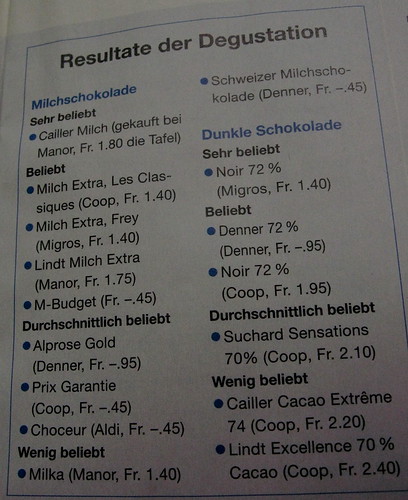
    The Swiss consumer magazine K-Tipp published the results of a chocolate degustazione.

    Resultate der Degustation

    I downloaded hours of video podcasts on CSS.

    African bloggers in Amsterdam:

    Picnic 08 (an annual tech. conference held in northern Europe) had a special Africa track called “Surprising Africa”. There’s a short video featuring the speakers here (via tweet).

  • Freeconomics

    Interesting background article, for future reference:

    We can start with a simple user question: why would we ever pay for anything that we could get for free? When anyone buys a version of something they could get for free, what are they purchasing?

    From my study of the network economy I see roughly eight categories of intangible value that we buy when we pay for something that could be free.

    In a real sense, these are eight things that are better than free. Eight uncopyable values. I call them "generatives." A generative value is a quality or attribute that must be generated, grown, cultivated, nurtured. A generative thing can not be copied, cloned, faked, replicated, counterfeited, or reproduced. It is generated uniquely, in place, over time. In the digital arena, generative qualities add value to free copies, and therefore are something that can be sold.

    Source: Edge: BETTER THAN FREE By Kevin Kelly. Via Appfrica.

  • Useful Mac Tool: Skitch

    It’s been one year and one month since I moved to Mac. And in line with the underlying concept of this post, I’d like to recommend a Mac OS tool which I find very useful:

    Skitch

    If you have a look at my Flickr stream, I tend to post a number of screenshots to collect ideas and illustrate blog posts. Skitch is great for this.

    I found that Skitch is more intuitive than Apple’s Grab. By default Grab creates TIFFs, which I find more cumbersome to handle and an overkill for quick notes.

    I like the Skitch annotation features (text, arrows, circles, squares). This helps to interact with external contractors much faster. And I can easily send the screenshot via Apple Mail.

    I post to my Flickr account directamente without a detour to Flickr Uploader. And Skitch keeps a history of recent photos and screenshots, which I can easily drag to a desktop app like Powerpoint.

    A productivity tool to consider!

  • The RSS Footer

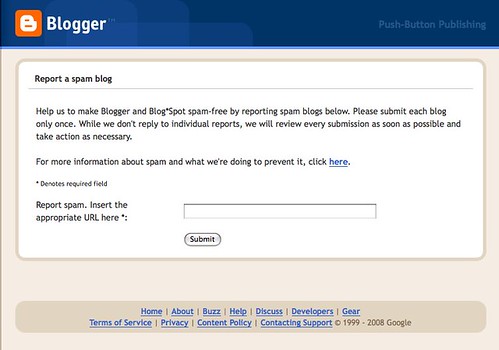
    One of my regular Google alerts currently points to a blog that is scraping entire sections of my content and displaying these on a Blogspot site.

    I have reported the Blogspot site via this website:

    Blogger Help

    And I’m well aware of the fact that anything I publish on the world wide web is up for grabs. It’s a well-known fact. The minute you offer an RSS feeds, scrapers can easily pull your content and display it anywhere they like.

    And you depend on the big search engine company to sort out the original from the copycats.

    That’s why I like this tagline: “Make the scrapers work for you!”.

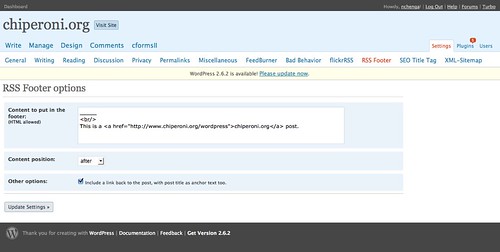
    If you’re using WordPress, download the plugin and upload it to your plugin folder. Activate it in the Plugins view and then open Settings > RSS Footer to add a text and backlink:

    chiperoni.ch › RSS Footer Configuration — WordPress

    Click Update Settings.

    Finally, ping Feedburner (if you’re using it) and you should see the changes show up in your feed.

    If you’re using Blogger (and you understand German), see Mlle. A.’s excellent tutorial.

    See also:
    How to foil scrapers on your blog
    The Lifecyle of a Blog Post

  • Where were you seven years ago?

    When I was a kid, my mom told me that she’ll never forget where she was when she heard that John F. Kennedy had been assassinated. She was at a train station waiting for a train to arrive, when suddenly the news spread that JFK had been killed.

    I’ll never forget where I was when I heard about 9/11. I was at work in Lugano in an open-plan office, a typical Dilbert-like office setting. A work colleague came by and said something to the effect that the USA was being attacked. Various Internet news websites such as CNN or Yahoo were down. A colleague and I headed downstairs to the pub to see if we could find a TV. But somehow the satellite receiver wasn’t set up. So we headed back into the office.

    On the second floor, somebody hooked up a PC, a TV reception card and an online projector. And everybody sat there watching.

  • My BlogCamp Switzerland Talk

    As announced on Twitter, I presented a talk on mobile technology in Malawi at today’s BlogCamp in Zurich to share what I’m learning from the African blogs and tweets that I follow on a regular basis.

    I started my talk with a short intro on Chiperoni (I am a bridge blogger somewhere between Basel and Blantyre) and why I blog. How much I appreciated Alex Antener’s news stream published on a Polytechnic server during the last Malawi general election. Then pointing to White African’s blog post discussing Twitter’s decision to discontinue its SMS service to the rest of the world. I tried to point out the potential a “Twitter to SMS” service could have for Malawi, where most of the population does not have access to the internet or even a plain old fixed telephone line.

    Soyapi Mumba's Blog: The Potential of Twitter in Africa

    I described the current situation. And how this is changing with mobile technology. I pointed to Mike McKay’s blog post about a rural area in northern Malawi where villagers climb an ant hill to get a better signal.

    In Switzerland we take a lot of things such as the excellent infrastructure we have for granted.

    I shared some of my observations from my recent holiday in Blantyre, some data on the pricing models and how public wifi is being introduced in urban areas.

    tnm || always with you

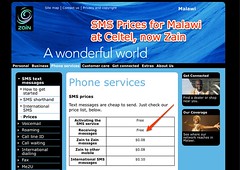
    Zain Malawi - SMS text messages - Prices

    I was a little shaky on the stats side of things, telecommunication regulations, as well as who owns the major cell phone service companies, TNM and Zain. I’ll need to do more research here. I might have got some of my facts mixed up.

    I did refer to the new airtime tax that is being introduced.

    Examples referred to:

    This talk was inspired by White African’s and Soyapi Mumba’s tweet streams. Zikomo kwambiri. Keep on tweeting.

    Flickr credits: White African, Hackerfriendly, all other photos are my own.

    Big zikomo to Persillie and Mlle A. for reviewing my slides!

    I enjoyed presenting very much (note to myself).

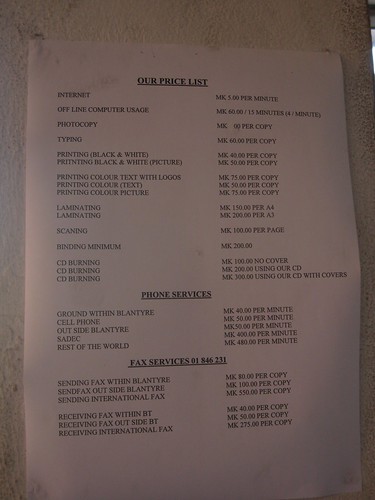
    Oh and I forgot to mention my chat with a Limbe internet cafe manager during the talk…

    Limbe Internet Cafe