Gapingvoid posted on why he is giving up Twitter and Facebook
it’s not your content, it’s their content.
Gapingvoid posted on why he is giving up Twitter and Facebook
it’s not your content, it’s their content.
I cycled to the Glatscheria in Basel for 2 delicious flavors of ice cream.
I had lemon and melon. Cost 7 CHF. Delicious and creamy.
Summer in the city…
Do you know about digital sharecropping – (So this is what it’s called)
G+, Etsy, FB, Twitter, eBay, Skype, Flickr…
What is the best Twitter client? I’ve tried several web and smartphone apps. Here are some observations:
Despite all odds, i use the web version of Twitter a lot. Mainly cos browsers are ubiquitous. Twitter is trying to improve the display and usability. Newest addition: possibility to add photos. Performance and stability have improved enormously over the past year. I haven’t seen the fail whale for a while.
I would greatly appreciate
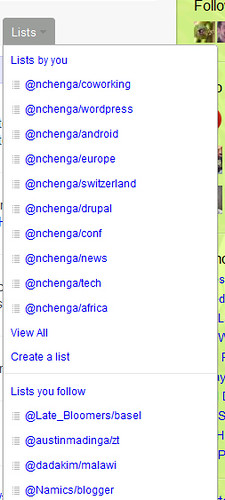
I maintain several Twitter lists. My largest list aggregates Malawian twitterers. But within the list overview, I always need to click one more time cos Twitter organizes lists chronologically and not according to activity or number of tweeple listed.
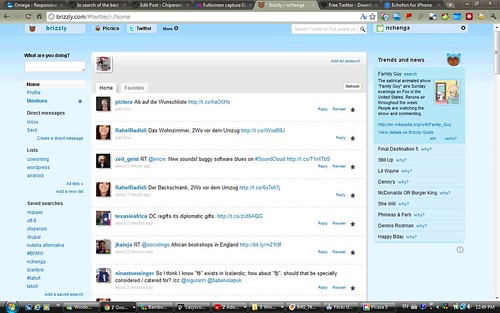
I liked this web app in the beginning. But I’ve stopped using it. Cos some months ago it really pushed Direct Messages (DMs) in my face. And it wasn’t aware that i had already viewed these. In addition, as Twitter reduced and tightened access to the API, it had performance issues. Brizzly was an early mover and showed the potential of Twitter integration with photos and other web apps. I like the Twitter trend feature, where users can explain trending hashtags.
At the time when Twitter rolled out the (controversial) Retweet button, Brizzly allowed us to add a comment to a retweet.
(e.g. now 11:32 CET, I can’t access Brizzly.com to get a screenshot)
(Very sad)
(later:)
My ideal Twitter web app is an interface without all the bells and whistles, minimal use of AJAX, no fancy auto-lookups, no images integrated, and really fast and reactive. Pure HTML. While looking for an HTML-only Twitter web app, I stumbled across Streamie:
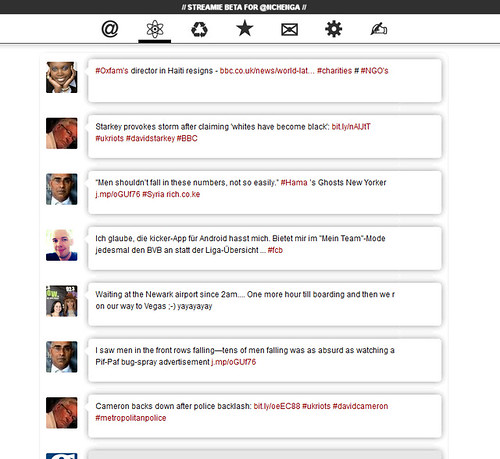
I like their general idea. I like their ideas on structuring public tweets and DMs:
I would like them to reduce even more. Focus on speed and performance. Although those very factors are limited by the Twitter API.
My favorite Twitter app is on the Mac.
Twitter for Mac is by far the fastest, most responsive Twitter app I’ve ever used. Very close if not identical to the iPhone variant. End of search.
But this is a multi-operating system household (Ubuntu, Windows 7, Windows Vista, Mac). Which means I have also been investigating Windows-based Twitter apps. A recent find is:
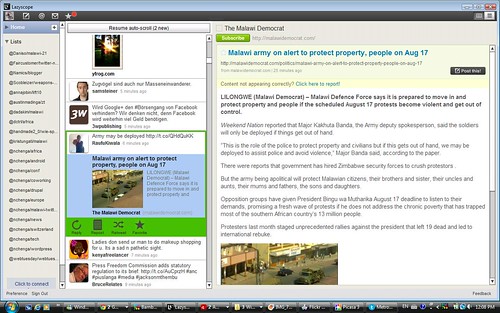
The column layout reminds me of Tweetdeck. I haven’t really put it to the stress test yet. Though I am hoping that it will provide a good native app for Windows. Cos i love to hate Adobe AIR used by Tweetdeck and Lazyscope.
I use Lazyscope regularly cos it visualizes articles and images in the panel next to the timeline. I follow a lot of world and tech news. Lazyscope is a cool way to read article links in the same view. Much like Flipboard and Paper.li. At the same time it’s a Twitter client with all the RT and post a tweet goodness that you can expect.
Downsides:
I use the following smartphone apps:
I use an old version of the free Echofon app on my 1st generation iPod Touch. Works ok.
Downside: it displays ads.
I like the BB app for Twitter. It was pre-installed and it’s close to the Twitter for Mac app in functionality and all. And – for me – the BB is easier to type on than the iPod touch keyboard.
The major challenge ahead
Third party apps are getting hurt by Twitter’s unpredictable API changes, feature changes and acquisitions. While on the one hand it is understandable that Twitter want market share “on the last mile”, it is the surrounding Twitter eco-system which has made Twitter itself so successful.
Will developers quit building apps for Twitter?
One of the downsides as a user is the limited access to my own data, c.f. previous post on data silos.
My current fave is Twitter for Mac
BTW, if you’re starting a blog – cos it’s an easy way to increase visibility… Have fun. Those times are long past. Way back in 2002 and 2003. Ask the bloggers behind Chiperoni and Handmade2.0.
And… even in 2003 it wasn’t as “easy” as some of the internet experts try to make it sound. Blogging requires time, energy, passion, expertise, creative writing skills and a good topic. Handmade 2.0 is the perfect example.
I have recently been re-reading some of Dave Winer’s warnings, regarding adding all your valuable data to the corporate micro-blogging silos aka Twitter, Facebook. In this post he explains why the silos are not open:
On the other hand if you put your data in WordPress.com, you can export your data if you decide to leave.
Your best option is zero lock-in. Static HTML and RSS.
We need independent, open, ad-free blogs.
Compare the Google Plus launch where apparently…
“they are only accepting people who have strong social graphs so that they can both make sure everyone has a good first experience as well as test out some of the technology before opening it up to a wider audience”
This is just like pre-blogging traditional media. The gatekeepers control who gets to see what first.
One of the reasons why I keep returning to my online playground is the fact that I love browsing through the notes and ideas and links and tools. I like my online scrap book of my years in Basel. It’s also a history of social media apps and software that I tried. Thoughts like today’s.
This Copyblogging article has some excellent tips how you can get some visibility. Bloggers treasure well-written, intelligent comments that contribute to a topic. Instead of lurking, add a comment why you enjoyed reading a blog post. Say thank you for useful content. Zurich blogger and social media consultant Su Franke has a list of ways you can say “thank you” to a blogger (in German).
Don’t just feed the data silo! Stay free.
In conclusion I want to point to this blog post that I think is true. It’s about the daily decisions that we face and that shape our lives. I worry about the big decisions in life, but the daily crossroads have an impact.
In Project World, on the other hand, every day offers a choice that could change things. Should you start a new project? Organize a conference? Open a new channel of social media? Quit something you’re doing right now to make time for something else?
It’s easy to get stressed and excited about the infrequent crossroads. It’s just as easy to ignore the daily opportunities you have to change everything.
Some keyboard functions are ingrained.
Ctrl-F5, Ctrl-C, Ctrl-S
But some are not.
E.g. by accident i hit the F11 key in Firefox and had to google to find out how to get back.
Luckily I am not alone….
I made my firefox full-screen; how do I change it back?
I was typing a message and accidentally hit more than one key and my firefox went full-screen and I don’t know how to fix it.
I went Flickr photo walking with 7 other Flickrites in the Dreispitz industrial zone of Basel.
Here are 25 of my snapshots for your perusal:
So excited. I found a picture of Mount Chiperone – the name giver of my blog.
The internet is amazing.
I cycled over 60 km to Bad Säckingen via an unwanted detour to Liestal, and then on to Rheinfelden, Möhlin, Wallbach, Stein. I cycled back on the German side via Schwörstadt, Grenzach-Wyhlen.
No mountains. A few hills.
I only took a few photos. Coming soon.
A quick blog post to document Monday’s mini tour to Bad Bellingen and back.
I wanted to avoid cycling along the Rhine cos it is so monotonous and boring on the German side (done it before and found it boring). I started ok but somewhere between Märt and Efringen-Kirchen all bicycle path signs took me down to the river. So I ended up on the Rhein-Radweg. On my way back, I took a different route via Istein village.
About 20 km one way. Easy ride.
Some snapshots
Some architecture snapshots of a church built in the mid sixties. Unfortunately the door was closed so I’ll have to go back for the glass windows.
2 resource links – for future reference
from a survey:
keyword is the exact-match root domain
keyword present in the title element/tag
uniqueness of the content on the page
uniqueness of content across the whole site
search volume for the brand/domain
authority of users tweeting links to a page
quantity of unique domains linking to the domain
CTR from Google to the page for the keyword
quantity of unique linking domains that contain a link employing keyword as the exact anchor text
From Basel about 17 km one way.
Via Weil am Rhein, Binzen and Wollbach, along the railway tracks to Kandern.
Easy ride.
Wow, Google Maps now offers a bicycle option in its Get Directions menu. Though not for the route below.
View Larger Map
I want to write a blog post on SEO. My primary motivation is to learn what the changes are and I learn best by writing my own notes.
Here we go. Some notes on SEO off the top of my head and unsorted:
Panda
Following the Panda release and other algrithmic changes by Google, the net is full of speculation – even to the extent that email newsletters may influence results – a fact that was refuted by Matt Cutts. (Shame on me – I retweeted the link before reading the comments. Note to myself: Read before you retweet. But somehow I fell for the arguments cos it sounds realistic.)
Google offers the following advice on developing high-quality content.
But…
After reading the comments I compared search results between Bing and Google. I guess it depends on the search terms but i don’t see Bing results being better than Google just yet.
SEO tools
I’ve got a list of Drupal SEO tools via Volacci and Netnode which I’ll post sometime soon.
And … Here on my WordPress blog I use Yoast’s SEO tool.
But to be honest I enjoy blogging and hiding in full public view. Chiperoni.ch is my knowledge base and my memory lane and my notepad and my diary.
Social SEO
Besides SEO, social media references are gaining importance. And definitely influence my click.
If somebody in my Twitter network recommends a link, it gets my attention. If over 400 people “like” Handmade 2.0’s article on Facebook, I am going to pay more attention.
Referring links
Backlinks from high ranking websites remain important.
I stumbled across this SeoMOZ presentation discussing the full bandwidth of inbound marketing:
This looks interesting
Source: Infamy
A Joomla 1.5 1.0 website that I take care of was hacked with an eval (gzinflate(base64_decode(
By chance I had read this article on why you shouldn’t google for free WordPress themes – with a list of sites that help with decrypting.
Scary.
The blogger behind Handmade2.0 has written an article about setting up a business and the various things you need to take care of (business licenses, taxes, copyright and license infringements, etc) for Feed-Magazin.
Well done!
I finally found the top 500 list of top hardware, telecomm, networking and software companies in Switzerland.
If you know where – it’s easy to find…
Update 29 April 2019:
I recently took part in a webinar on increasing website traffic.
Here are my notes:
10. Engage socially
Engage and participate in online conversations in a pertinent and relevant way
Keep track how people respond
Track how many people reach the site via FB and Twitter
Tweak your message
Repeat
Rule of thumb regarding social media content:
Original thoughts 30%
Reposting 25%
Conversation 25%
Marketing 20%
Twitter and Facebook are the must-dos for social media
9. Offer significant call-to-actions
e.g. button in a different color and size
8. Get more links
Use Competitive Link Finder by SEOmoz to find where competitors are getting backlinks
Find linking partners
7. Fix the links you’ve got already
i.e. ask websites that are pointing to your website to update their links if the links are broken or not up-to-date
6. Use multivariate testing – A/B testing
Change one thing at a time and watch the results, i.e.
Tools:
Google Website Optimizer
Visual Website Optimizer
5. Put the keyword on the page
Include the keywords in the
Don’t overdo it. Write web pages for humans not search engines
Meta tags (description, keywords) are ignored by Google – no longer checked.
4. The secret of awesome web headlines
Work on your headings.
Cross-reference to http://www.copyblogger.com/10-sure-fire-headline-formulas-that-work/
3. Don’t make me think
We don’t read pages, we scan them
We don’t make optimal choices, we satisfice
We don’t figure out how things work, we muddle through
Design for Power Skimmers
2. Know your Google Analytics
1. Begin with an SEO Audit
(this is where the presenter added a sales pitch for their own services)
Tools recommended:
http://www.marketsamurai.com/full-version.php 149 US$
Google Adwords Keyword Tool – Google has largest base of data
Crazy Egg 19$ per month
a fave from my collection of snapshots:
A comment on the outside of a construction fence at the Novartis campus in Basel
We’ll quit tomorrow
Where were you on 9/11? On a day like this, I can’t help but remembering where I was 9 years and 7 months ago.
I was in Lugano at work. All news web sites were down. I went in search of a TV together with my colleague Y. The TV in the pub downstairs wasn’t set to receive news. Later we found that the R and D engineers had hooked up a PC with a TV card to a projector. And many of us watched the news until late in the afternoon.
Following my timeline in Twitter this morning was great. The people I follow form a great world news channel.