Category: web

  • Blogging in 2026

    Writing a blog entry in 2026? I stumbled across this list:

    1. Title: Include keyword + SERP research.
    2. Author Bio showing EEAT.
    3. Images: 5+ w/ metadata.
    4. Links: 5+ internal + external
    5. 1500+ words/blog post based on SERP.
    6. Table of Contents. Easily jump around!
    7. EEAT: Show off expertise in the content.
    8. CTAs: In content, sidebar, conclusion.
    9. Social share buttons.
    10. Top notch quality writing.
    11. URL: Short + includes keyword.
    12. Optimize for mobile experience.
    13. Proper spacing: Make it readable.
    14. Sidebar w/ links + clear Call to Action
    15. Font: readable + popular for blogs
    16. Color: Easy on the eyes – #333333
    17. Exit intent pop up to capture leads
    18. Proper use of headings (H1, H2, etc.)
    19. Video embed + infographics
    20. Quotes from SMEs on the topic

    Wow.

    Lots to consider.

    Writing to gain visibility is not easy.

  • Ancient Poetry

    Ancient Poetry

    Over the years I collected text passages from ancient literature. I shared the texts with a friend on Flickr and on Instagram. In the past couple of weeks, I collected the texts and added them to a self-made Lovable app. Yesterday I deployed the app to a sub-folder here. Have a look. Tell me what you think.

    Ancient Poetry
    I built an app called Ancient Poetry

    It’s my fourth AI app. I am learning lots about AI coding, Lovable, GitHub, Terminal, Antigravity, VS Code, React, JavaScript, data structuring.

    From idea to architecture to building to debugging to deployment. Here’s a summary for my AI skills portfolio:

    AI-Assisted App Development

    Built the web app Ancient Poetry, a mobile-first scripture reflection app.

    Skills demonstrated:

    • AI-assisted product design (ChatGPT + Lovable)
    • JSON data modeling for structured verse content
    • React + Vite frontend architecture
    • static web deployment and debugging
    • PWA fundamentals (manifest, service worker)
    • content architecture and metadata design
    • prompt engineering for AI development workflows
  • Building an SPA with Lovable.ai

    I’ve been playing with Lovable.ai. I generated a mobile-first SPA for low-bandwidth use, including hreflang, Schema and all the other Tech SEO features that I want as a Digital Marketer.

    Exciting. Reached the end of my Lovable credits for the month and I need to subscribe now….

    What can I say? I like it. It’s exciting. Great way to build prototypes.

    Granted: You do need knowledge of web development and web servers.

    I also tried blink. But the trial is way more restrictive. And i don’t have access to a Git repository of my generated code like i do with Lovable.

    Your thoughts?

  • Search Is Changing — Is Your Website Ready?

    Search Is Changing — Is Your Website Ready?

    A few years ago, I wondered what could ever replace Google Search.
    It felt dominant.

    Fast-forward to 2025.
    We’re already searching differently.

    Bing / Copilot.
    Perplexity.
    Claude.
    ChatGPT.

    Looking at my own behaviour: I often start with one of these instead of Google Search. The change is real.

    Google is still well-positioned. Gemini is strong.
    Google has added AI Overviews to the top of many SERPs.

    If you’re in Europe, take this seriously:
    Prepare your website for Google’s AI Overview rollout.

    Direct traffic will drop. There will be a rise in zero click search results, which means a fall in visits; CTR (click thru rate) will fall. This also entails a change in how you measure: You’ll need to measure success differently. Again, not a surprise to many of us who’ve seen Google Search evolve.

    Here’s what you need to focus on:

    1. Your site must be machine-readable

    Avoid hiding content behind JavaScript.
    Make sure navigation and core content are accessible to bots.

    2. Build clean, fast sites

    Simple structure. Fast load times. Optimized media.

    3. Use good structured data

    This was always a best practice — now it’s essential.
    AI bots use structured data to understand your content and its relationships.

    • Revisit your current schema — what more can you add?

    4. Review your robots.txt

    Who do you want to access your content?
    Search engines? LLMs? Agents?

    You can now fine-tune this. Think about how your content is used and who benefits.

    5. For documentation-heavy sites: add llms.txt

    This file helps LLMs find and understand the content you want them to read.
    It’s also useful for feeding structured content to tools like Claude.


    We’ve entered the answer engine era.

    Make sure AI understands your content — better than your competitors’.
    Make sure your website answers real questions your users have.

    Create strong, useful content:

    • In-language
    • In-region
    • With local relevance
    • That adds real value

    Search has changed.
    Let’s make sure our websites keep up.

  • The CMS of the day

    WordPress dominates the CMS market. A statistic floated by this week, citing over 60% market share.

    Via this useful GSC template for GDS, I landed on this page, discussing the dilemma of choosing the right CMS. Wanting to switch from WordPress to a new CMS is about:

    • Questioning my current usage. Do I need all the features WordPress offers?
    • Can I do better with a newer CMS?
    • Am I ready to break things to start from scratch?

    Given that this WordPress install is more of a playground for me.

    A sandbox to try things and reflect on articles I read.

    A place to collect snapshots and memories. I happily don’t worry much about which CMS to use.

    I’ve reduced on plugins. Planning to kick out even more.

    I am more baffled by the fact that I am still using the same CMS. 18 years later. I think that continuity is valuable.

    We have it in our own hands to reduce WordPress bloat.

  • Slides: SEO for small business websites

    Here are my slides from my recent Women in Digital talk in Basel. I made them “resource-full” with lots of background links.

    The session was interactive from the start. Lots of questions throughout. Wow. I think the topic hit a nerve.

    Notes:

    SEO for small business websites

    How do you get found in an increasingly busy and complex online search market?
    Are you a small business owner looking to get started with SEO? Already got a site up but the traffic is low? In my presentation I discussed key requirements for a web presence and how to stay focussed.

    Intro

    Be nimble, fast, smart – use your smallness as an advantage

    “Small businesses can compete with large companies if they keep in mind that search engine optimization is a marathon, not a sprint.”

    1) Learn the basics of SEO

    • Read “Intro to SEO” guidelines (MOZ, Backlinko, Google)
    • Take an online course

    2) Do your marketing homework!

    • What segment are you trying to reach?
    • Who is your potential client?
    • What is your core message?
    • How would you present your services/products in a telephone call/face-to-face meeting?
    • What kind of words does your potential client use when referring to your services/products?

    Carry out:

    • Customer Interviews
    • Keyword Research

    See also my previous blog post on SEO for B2B services and products

    3) Does your site match the intended purpose? Does it answer your client’s question?

    Google looks at your site as a whole, as well as on a per-page-basis. Keep in mind that SEO is evolving. There are lots of additional items you need to grapple with.

    • Usability
    • Engagement
    • RankBrain
    • Search Intent
    • Structured Data
    • Voice Search

    4) On-page factors

    • Page title/ meta descriptions
    • Internal links
    • Unique page, url, page title, meta description and content (don’t copy content from other sites or make duplicates of your own)
    • Alt image tag
    • Heading 1 and 2
    • Related terms

    5) Local

    • Claim or create a Google My Business listing.

    I expect Google to offer more local search results, based on location and tailored to smartphone sensor data.

    6) Technical SEO

    In 2018 technical aspects will re-gain importance. Test your page speed. Clean up crawl errors and duplicates.

    • Fast web hosting
    • Page speed – Get rid of bloat in your CMS
    • Make sure pages get indexed – Google Search Console is your friend
    • Minimize of crawl errors

    7) Plan your content

    • Editorial calendar with deadlines
    • Quality content
    • If you have a blog, blog at regular intervals. Freshness is (still) a ranking factor. Blogging helps you to find out what works or what doesn’t

    Text fonts and page layout matter:

    “On an average web page, users read 20% of the words.”

    Include:

    • Heading 2s
    • Bullet lists
    • Images

    8) Promote your site

    • Regular email updates/newsletter, e.g using Mailchimp
    • Content amplification – share on social media (Social Media link isn’t a ranking factor but it helps with getting attention; getting indexed by the Google bot; building a community of followers)
    • Network online and offline – present at barcamps, meetups

    9) Measure. Add improvements. Repeat.

    A page isn’t getting enough traffic? Why? Thin content? Go back and try and figure out why. Test how you can improve? Add Heading 2s. Add an additional paragraph.

    “What kind of web content would you find useful?”

    Ask your clients for website feedback.

    Or if it isn’t working, maybe you’ll need to re-think your marketing approach?

    Links:

    SEO basics for entrepreneurs: Easy tips for optimizing your website

    Small business SEO: Your questions answered

    How to Rank in 2018: The SEO Checklist – Whiteboard Friday

    How Google Gives Us Insight into Searcher Intent Through the Results – Whiteboard Friday

    Free add-on: Answers to the questions on Slides 9 and 10

    Before my talk, I asked some entrepreneurs in my community what SEO questions they have, what challenges they face. Here are some answers of the top of my head:

    Question 1: I don’t want to invent the wheel, so what basics do I need to know about SEO or do myself?

    My answer: I recommend reading Moz’s beginners guide to SEO. If you are publishing your own website content, please read thru the section on on-page ranking factors. On-page changes are the easiest to influence and take care of.

    The other thing to watch out for is that your small business website follows best practises.

    If you are using a content management system, make sure the site is fast. Try to reduce CMS bloat as much as possible.

    Check that each piece of content is accessible via only one URL.

    Duplicate content issues may arise when Google can access the same piece of content via multiple URLs. Without one clear version, pages will compete with one another unnecessarily.

    In developer’s eyes, a page is unique if it has a unique ID in the website’s database, while for search engines the URL is a unique identifier. A developer should be reminded that each piece of content should be accessed via only one URL.

    (Source: Strategic SEO Decisions to Make Before Website Design and Build)

    Plan your site structure. Decide on languages and regions.

    Question 2: What are the top 3 mistakes that I have to avoid?

    My answer: There’s lots of things that can go wrong.

      1. Avoid vague, sprawling websites with lots of sub-menus and thin content, especially if you are a small company. Put your client at the center, instead of your product/department/company achievements. Always ask yourself what search query does my site want to answer, what is the purpose, what keyphrases do my clients use.
      2. Not filling in the page title and meta description tags with a useful summary of your web page. The page title is the first part of your web page that web visitors see in the search engine result pages and it influences your SEO. Yet, very often you see “homepage”. The meta description helps web visitors decide to click on a link or not. On-page SEO is easier to influence and change.
      3. Get the basics up and running. Unstable, flaky web hosting or a broken user experience will hurt your web reputation. And make SEO harder.


    Question 3: Is SEO and web design totally connected, or can I outsource this to separate providers?

    My answer: Web design and SEO are connected by the words usability and user experience. Google looks at engagement metrics. If web visitors land on your web page and leave after a split second, despite having good SEO content, then it might be due to your web design. You don’t need to assign design and development to the same provider. The times when designers wanted to use Adobe Flash for their designs are thankfully over. If your website design follows common web design patterns, you’ll be fine. Make sure the fonts are easy to read on different devices

    Question 4: How do I select an SEO provider?

    My answer: Ask lots of questions. Be wary if they promise too much. Discuss your business goals.

    Via Moz here are some questions to ask:

    • What process are you going to use to accomplish my business goals, and why do you use those particular processes?
    • What is your communication and reporting process? How often? What metrics do you report on? How do those match up to the business goals?
    • What do you do when things aren’t working?

    Question 5: How regular should I, or my provider, work actively on the SEO to keep the good results? Or: what is my decay-time?

    My answer: It depends on the purpose of your website. If you are building a webshop or an e-commerce app, you will need to invest a lot more energy, time, resources, and money than if you are a consultant for a service that is highly in demand.

    As a newcomer, you’ll need to build a web reputation.

    If I’m building a consultancy business, I’d start off with blocking off 2 SEO time-slots per week.
    A typical, regular SEO content activity is for instance

      1. writing a new blog post and promoting it within my community
      2. re-visiting a core service page to add a new paragraph


    Question 6: Should I do SEO in every language of my website?

    My answer: Yes. Without adequate SEO keyphrase analysis, the translation doesn’t perform well. After translation, you should check and adjust headings and tags to match your primary and related keyphrases.

    Question 7: Is SEO scalable? Meaning: if I have set up my SEO properly, that with every added search word, I have proportionally more results? Or do I have diminishing returns, every time I add a search word, or content improvement? Where do I reach the optimum in money and effect?

    My answer: If you’ve built a good web reputation and found the topics that your clients are interested in, it will get easier. Please note: SEO is a mid-term or long-term investment. There’s a risk that Google will change its algorithm and something that worked 6 months ago may no longer work now. Google is investing heavily into artificial intelligence and in some ways this will level the playing field. I would focus on finding the topics and questions that your clients are looking for. Build a website that helps clients get their jobs done.

    Question 8: How do I measure success with SEO? Proof that it works!

    My answer: This is the huge benefit of digital marketing. It is measurable. Before starting any SEO project, decide on your measure of success and discuss in detail with your SEO provider.

    Again, consider your business goals: What’s the purpose of your website? Do you want to get more contact form submissions? More downloads? More shopping cart submissions? Measure a conversion rate that is important for your business success.

    I would avoid vanity goals like “more traffic”.

    Question 9: What are the content activities I should do that help with better SEO results? Like: weekly blog publication, news items, reposting other people’s content”¦ etc?

    My answer: Blogging is a good way to get started and to find what resonates and what doesn’t. If you have relevant news or if you are attending an event, I would also share these. I’ve moved away from “content curation” (= reposting other people’s content) for B2B purposes. Curating content is time consuming. If you see a piece of content that fits, I would quote it but try to write my own version. Consider other content types such as interviews, videos, audio podcasts. And build good pillar pages on your core topics.

    And once you have created good content, give it as much promotion as your budget and resources allow.

  • Learning to use Hugo to build websites

    I’m learning how to use Hugo to build websites. I signed up for a Udemy course by Dan Hersham.

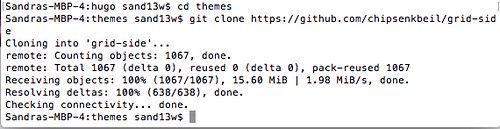
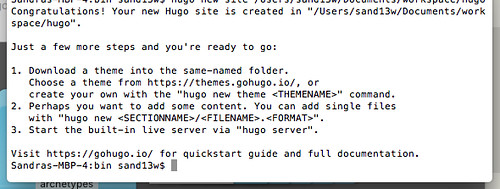
    I followed the tip to use Homebrew. And 2 to 3 commands later I had generated a skeleton of a site.

    installing hugo theme

    new hugo site

    Hugo is well-documented and it looks like an exciting alternative to explore.

    It supports TOML, YAML and JSON.

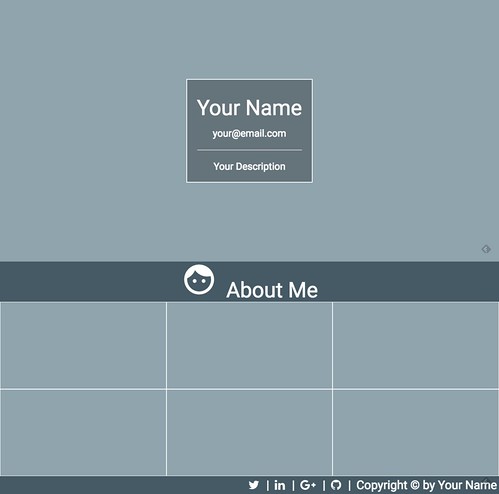
    using hugo to build a webpage

    I still have a couple of lessons to go thru in my Udemy course.

  • Content first

    Last Saturday I attended UX camp Switzerland. A very good event to learn about user experience, human-centered design, usability testing, MVP and prototyping tools.

    Talks I listened to:

    Stefanie Klekamp presented lots of background info on the Think Aloud usability testing method. Which I found useful. She explained the theories behind the method and also pointed to the research and shortcomings of the test. Shortcomings such as confirmation bias and evaluator effect. She briefly touched on Hawthorne effect, Rosenthal effect, primacy recency effect, hindsight bias. Practical tips for your next Think Aloud user test:

    1. Carry out a SWOT analysis of the website or app that you are testing beforehand.
    2. Take simple notes immediately.

    Overall conclusion: Think Aloud user tests are a good practical method to test websites and apps early and often.

    Next, I attended a talk by Tobias Günter called “Texter sind die besseren Designer” (in English: “Copywriters are the better designers”). His message was: We spend lots of time and resources on design and programming our web apps, but the content itself is often an afterthought. It’s reflected in the words we use: “Texte abfüllen”. Often there’s no content plan to begin with. Concept work is often based on “Lorem ipsum” dummy texts. If you consider the slogan “mobile first”, it should really be “content first”. Content is the reason people visit a website, or install an app in the first place. Often, content is not developed for mobile devices. Some copywriting guidelines to consider:

    • Keep it simple – only 1 thought per sentence
    • Add sub-headings
    • Add structure
    • Add some redundancy and repetitions
    • Add a focal point for images

    Some further tools mentioned to improve content development:

    1. Develop your content page as if there is no start page and no website hierarchy
    2. Develop your content as if there is no navigation, header, footer, sidebar
    3. Think of URLs as verbs
    4. Test your texts
    5. Develop your texts iteratively; continuously improve your content

    A good discussion followed. Every content page should be considered as being a landing page on its own. New developments include dynamic navigation entries depending on the content page I arrive at as a reader

    Some web agencies now carry out a content audit of existing and new content. I found a related presentation on Slideshare after the talk:


    Next, Samuel Frischknecht talked about minimum viable product (MVP) and presented some real-life client examples. He referred to a book called Lean UX by Jeff Gothelf. The lean process is

    1. Declare an assumption
    2. Create a MVP
    3. Run an experiment
    4. Collect feedback and carry out research

    The book looks interesting and maybe it will answer some of my open questions on Scrum and design.


    I attended more talks in the afternoon, but my ability to take notes decreased rapidly. I was tired.

    Conclusion:
    UXcamp was good. Many thanks to the organisers and sponsors. A good way to catch up on new developments and learn about a topic in one day.

    Disclaimer:
    All mistakes are my own. Please let me know if I got something really wrong. I’m here to learn. These notes help me to reflect and learn.

  • Scrum and Design

    At the day job, I am part of a Scrum development project. Within this context, I was searching for practical experience / best practices on how to manage the web design part of a web application.

    Before the project started, I asked some people for their advice and googled around. Just like the discussion at Stackoverflow on “How do you apply Scrum to the design part of web development?”, there seemed to be 2 streams of thought:

    1. Design screens as part of a sprint
    2. Design screens early on, ideally in the sprint before a function is developed

    After a couple of sprints (still in the newbie category), I recommend following the advice given in option 2: Start as early as possible working on your web app design and UI vision. Things like what kind of grid, what basic layout do you want to follow, and what the header and footer, as well as the basic navigation should look like. Design some of the main screens. At the same time, expect that interaction and design changes will occur.

    @persillie sent me this useful article. IMHO this is a very good quote on this topic:

    Resist the temptation to create the entire design upfront. The design should evolve based on the feedback you receive, and the details are created incrementally as part of the canvas grooming work.

  • Building websites with Jekyll, Github Pages

    This post has made me very curious. They use a different stack:

    Jekyll for page templates and static file generation
    HTML, CSS, and JavaScript files
    GitHub Pages static HTTP server
    Supplemented with external APIs where necessary

    I guess, you can convert WordPress to static HTML. I found this description.

    Looking a little further, there’s this setup using Really Static.

    Why static HTML? HTML is secure and faster.

    Speed: Any web server, will serve html files a lot faster than PHP generated files.
    Security: If you are serving just static files, there is no way to hack your site.

    Here’s a thread on the same at Quora

    And using the WordPress static output plugin

    Nice to know I could offer a flat static HTML version of this site.

    I will have a longer look at Jekyll.

    BTW, one year ago I tweeted about something similar:

    Any experience? Opinions? Further resources to look at?