Here are a couple of links in preparation for a meeting tomorrow where I get to explain how I use RSS feeds.
What is an RSS Feed?
- Definition: Wikipedia has a good overall description.
There’s a video explaining RSS feeds in plain English:
How do I use RSS feeds?
- To follow niche topics: to keep up with news and topics that I am interested in. My advice: don’t subscribe to any high-volume news feeds like CNN or the BBC. Use it to stay up-to-date on topics that you are following regularly, e.g. I’ve subscribed to a number of websites that write about technology in Africa.
- As a single-source input base with endless distribution possibilities: I can distribute and cross-reference items on other websites of mine using RSS. For example, I can display my latest Chiperoni.ch entry at another website and vice versa. WordPress, the web technology I use at this site, offers RSS feeds for comments, categories and tags. For example the RSS feed address for entries categorized as Malawi is: http://www.chiperoni.ch/wordpress/category/malawi/feed/
This is a simple but great way to make a website more dynamic. See also my recent prototype.
Advantages versus a regular email newsletter:
- I can easily unsubscribe a feed, if I want (less hassle than email newsletter).
- I can decide in what intervals I would like to receive updates.
- I can choose where I want to read a feed (in a desktop reader, in my email inbox or in web-based tool).
- I can subscribe to an RSS feed via email.
Tools:
I currently use Google Reader, a web-based feed reader. I have used dedicated desktop feed readers, other web-based tools, and the feed reader of Mozilla Thunderbird and Apple Mail. My preferences change from time to time. A web-based reader has the advantage of being accessible where ever I have Internet access and a browser. Email clients are great for a corporate environment.
More on Google Reader:
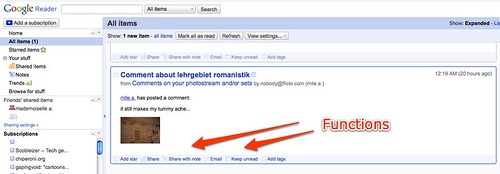
I can share, email or tag an entry within my RSS reader:
What else? Feel free to comment and describe your usage, while I catch some sleep.
