… that you can’t live without? Let’s leave out the hyperbole. But the links are good.
(I miss old Skitch but i don’t want to use Evernote. My killer app for notes is called Chiperoni… in combination with Twitter and Flickr.)
… that you can’t live without? Let’s leave out the hyperbole. But the links are good.
(I miss old Skitch but i don’t want to use Evernote. My killer app for notes is called Chiperoni… in combination with Twitter and Flickr.)
For future reference:
To view a folder of jpegs, select a photo within Finder and hit the space bar. Use the arrow keys to navigate up and down thru the folder.
Or select the files you would like to view, and right-click Open. Preview displays the photos. Use the arrow keys to navigate from one file to the next.
Type Alt + 3 to get the hash symbol #.
Executive summary:
Best tool to open .mht files on a Mac is Opera for Mac.
I regret deleting Windows Vista.
Last week I was sent a .mht file. And now I’m searching the Internet for a solution how to open this proprietary Microsoft file (my perception, but according to Wikipedia it is actually a proposed standard).
MS Word 2004 for Mac said something like this “is not a valid archive”.
I found this forum entry at Mac OS Hints.
The GraphicConverter way didn’t work for me. Only a small graphic file displayed. The rest of the content did not display. BTW, I’m not too fussed about GraphicConverter anyway. Maybe you use GC, if you only want to extract the images…
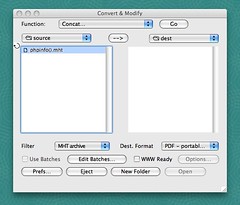
I’d recommend the Stuff It Expander way:
.html to the file labeled 00 and open with your standard browser… é voilà . Funziona.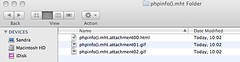
Another (probably simpler) way is to get File Juicer.
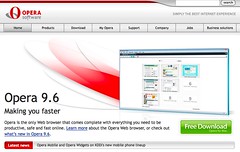
The easiest way to read .mht files is to install Opera on your Mac. Open the file to see the contents directly. No further renaming or converting required.
Executive summary:
Best Tool = Opera for Mac
It’s been one year and one month since I moved to Mac. And in line with the underlying concept of this post, I’d like to recommend a Mac OS tool which I find very useful:
If you have a look at my Flickr stream, I tend to post a number of screenshots to collect ideas and illustrate blog posts. Skitch is great for this.
I found that Skitch is more intuitive than Apple’s Grab. By default Grab creates TIFFs, which I find more cumbersome to handle and an overkill for quick notes.
I like the Skitch annotation features (text, arrows, circles, squares). This helps to interact with external contractors much faster. And I can easily send the screenshot via Apple Mail.
I post to my Flickr account directamente without a detour to Flickr Uploader. And Skitch keeps a history of recent photos and screenshots, which I can easily drag to a desktop app like Powerpoint.
A productivity tool to consider!